
Kia Cee'd: Features of your vehicle / Instrument cluster (Super vision)
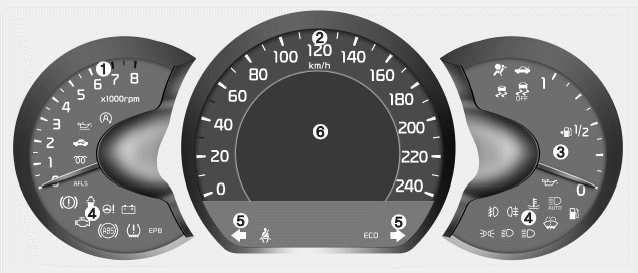
■ Type A
1. Tachometer
2. Speedometer
3. Fuel gauge
4.Warning and indicator lights (if equipped)
5. Turn signal indicators
6. LCD display
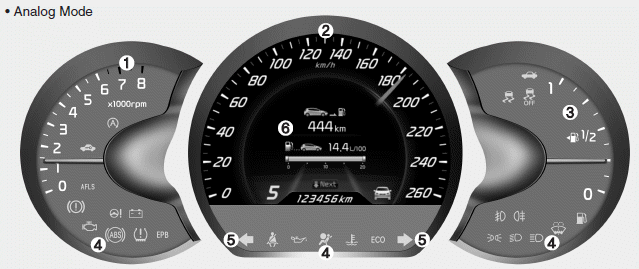
■ Type B (for T-GDI engine) • Analog Mode
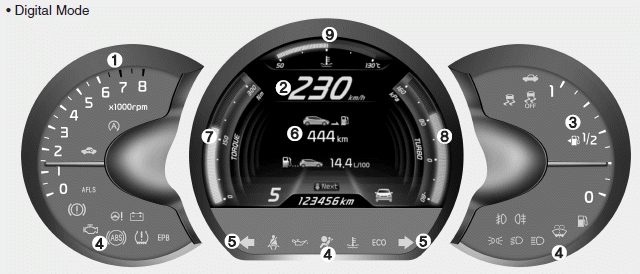
■ Type B (for T-GDI engine) • Digital Mode
1. Tachometer
2. Speedometer
3. Fuel gauge
4.Warning and indicator lights (if equipped)
5. Turn signal indicators
6. LCD display
7. Engine torque gauge
8. Turbo boost pressure gauge
9. Engine coolant temperature gauge
- Instrument panel illumination
- Gauges
- Manual transaxle shift indicator
- Automatic transaxle shift position indicator
- Dual clutch transmission (DS mode) shift indicator
- Speed limiter indicator
- Odometer (km or mi.)
- Trip computer
- LCD display information
- Warnings and indicators (Instrument cluster)
 User Settings
In this mode there are 3 kinds of the submenu.
WARNING
Do not adjust the User Setting
while driving. You may lose your
steering control and cause severe
personal injury or accidents.
1. S ...
 Instrument panel illumination
The instrument panel illumination intensity
can be adjusted as follows:
Ignition switch in the ON position
Pressing the upper or lower part of the
switch
The illumination intensity is ...
Other information:
Kia Cee'd JD Service Manual: Battery Repair procedures
Removal
1.
Disconnect the battery (-)terminal (A) and then (+)terminal (B).
2.
Remove the air duct and air cleaner assembly.
(Refer to Engine Mechanical System - "Air Cleaner")
3.
Re ...
Kia Cee'd JD Service Manual: Front Seat Assembly Repair procedures
Replacement
1.
Remove the front seat track mounting cover (A).
2.
After loosening the mounting bolts, remove the front seat assembly (B).
Tightening torque :
34.3 ~ 53.9 N.m (3.5 ~ 5.5 kgf.m, ...
