
Kia Cee'd: IMS (Integrated Memory) / IMS (Integrated Memory System) module Repair procedures
Kia Cee'd JD Service Manual / Body Electrical System / IMS (Integrated Memory) / IMS (Integrated Memory System) module Repair procedures
| Removal |
| 1. |
Remove the negative (-) battery terminal.
|
| 2. |
Remove the driver seat in the car.
(Refer to Body - "Front Seat Assembly")
|
| 3. |
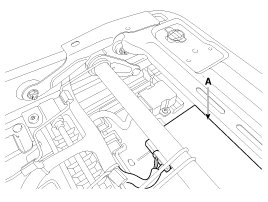
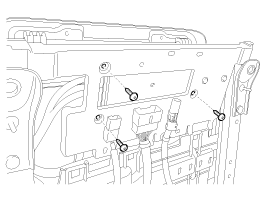
Remove the IMS module (A) after loosening 3 screws in the bottom of
seat.
|
| 4. |
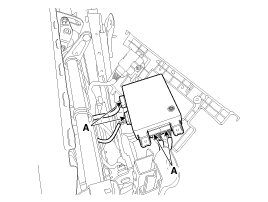
Disconnect the IMS module connector (A).
|
| Installation |
| 1. |
Install the IMS module after connecting the connector.
|
| 2. |
Install the front seat.
|

 Description and operation
Description
system outline
An optimal seat position set by a driver can be memorized in Power seat unit
by IMS SW, which enables restoration of seat position set by the ...
 IMS Power Seat Control Schematic diagrams
Circuit diagram
...
Other information:
Kia Cee'd JD Owners Manual: Engine compartment
■ Gasoline engine (Gamma 1.6GDI)
■ Gasoline engine (Gamma 1.6MPI)
1. Engine oil filler cap
2. Brake/clutch fluid reservoir
3. Positive battery terminal
4. Negative battery terminal
5. Fuse box
6. Air cleaner
7. Radiator cap
8. Engine coolant reservoir
9. Engine oil dipstick
10. Wi ...
Kia Cee'd JD Owners Manual: Static bending light
While driving the corner, for your sight
and safety, the static bending light turns
on automatically. The system will operate
automatically as follows:
When vehicle speed is under 10km/h
and steering wheel angle approximately
80 degrees.
When vehicle speed is over 10km/h
and ste ...
© 2017-2026 www.kceed.com
