
Kia Cee'd: Timing System / Idler Repair procedures
| Removal and Installation |
| 1. |
Remove the drive belt.
(Refer to Timing System - "Dreve Belt")
|
| 2. |
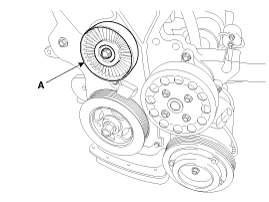
Remove the idler (A).
|
| 3. |
Install in the reverse order of removal.
|
 Idler Components and components location
Components
1. Idler
...
 Drive Belt Tensioner Components and components location
Components
1. Drive belt tensioner
...
Other information:
: Trailer Sway Control
How Does Trailer Sway Control Work
The system applies the brakes to the
individual wheels and reduces engine
torque to aid vehicle stability.
If the trailer begins to sway, the stability
control lamp flashes and the message
Trailer Sway Reduce Speed appears in
the information display.
Stop your ...
: Load Carrying Precautions
Keep your loaded vehicle weight
within its design rating capability,
with or without a trailer. Properly
loading your vehicle provides
maximum return of vehicle design
performance. Before you load your
vehicle, become familiar with the
following terms for determining
your vehicle’s weight ...
© 2017-2026 www.kceed.com
