
Kia Cee'd: Lighting control / High - beam operation
Kia Cee'd JD Owners Manual / Features of your vehicle / Lighting / Lighting control / High - beam operation
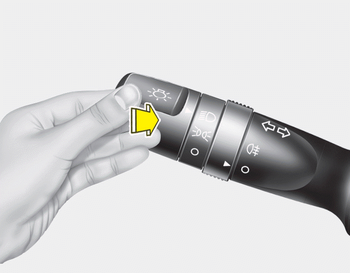
1. Turn the light switch to the headlight position.
2. Push the lever away from you.
- The high-beam indicator will light when the headlight high beams are switched on.
- To prevent the battery from being discharged, do not leave the lights on for a prolonged time while the engine is not running.
WARNING
Do not use high beam when there are other vehicles. Using high beam could obstruct the other driver's vision.
 Auto light/AFLS position
When the light switch is in the AUTO light
position, the taillights and headlights will
be turned ON or OFF automatically
depending on the amount of light outside
the vehicle.
If your vehic ...
 Flashing headlights
Pull the lever towards you. It will return to
the normal position when released. The
headlight switch does not need to be on
to use this flashing feature. ...
Other information:
Kia Cee'd JD Service Manual: Components and components location
Component Location
1. Hood switch
2. Burglar horn
3. BCM and RF antenna
4. Key warning switch
5. Front door switch
6. Front door lock actuator &
switch
7. Rear door lock actuator
8. Rear door switch
9. Tailgate open switch ...
Kia Cee'd JD Service Manual: Front Seat Back Cover Components and components location
Component Location
1. Front seat back cover
...
© 2017-2026 www.kceed.com
