
Kia Cee'd: Hands Free System / Hands Free Mic Repair procedures
Kia Cee'd JD Service Manual / Body Electrical System / Hands Free System / Hands Free Mic Repair procedures
| Inspection |
| 1. |
Disconnect the negative (-) battery terminal.
|
| 2. |
Remove the roof trim assembly.
(Refer to Body - "Roof Trim Assembly")
|
| 3. |
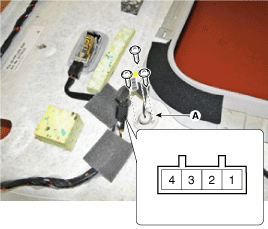
Remove the hands free mic (A) after disconnecting the connector and
loosening 3 screws.
|

| 4. |
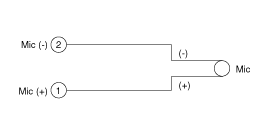
Check the continuity of Mic between terminals.
|
 Hands Free Switch Repair procedures
Inspection
Type A
1.
Check the audio remote control switch (A) for resistance between connector
3 and 4 in each switch position.
[Au ...
 Panoramaroof
...
Other information:
Kia Cee'd JD Service Manual: Troubleshooting
Failure Diagnosis
1.
In principle, ESP and TCS controls are prohibited in case of ABS failure.
2.
When ESP or TCS fails, only the failed system control is prohibited.
3.
However, when the solenoid va ...
Kia Cee'd JD Service Manual: DC DC Converter Description and operation
Description
Due to the considerably more frequent occurrence of starting operations, the
electrical load that occurs often leads to voltage dips in the vehicle network.
In order to stabilize the power supply for certain voltage-sensitive electrical
components, a DC/DC con ...
© 2017-2026 www.kceed.com
