
Kia Cee'd: ABS(Anti-Lock Brake System) / Front Wheel Speed Sensor Components and components location
Kia Cee'd JD Service Manual / Brake System / ABS(Anti-Lock Brake System) / Front Wheel Speed Sensor Components and components location
| Components |
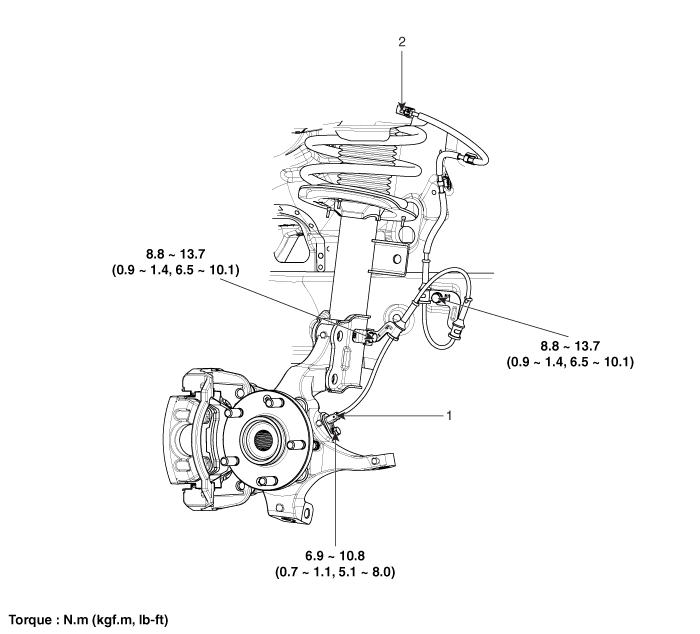
| 1. Front wheel speed sensor
2. Front wheel speed sensor connector |
 ABS Control Module Repair procedures
Removal [LHD]
1.
Turn the ignition switch OFF.
2.
Pull up the lock of the HECU connector (A), and then disconnect the
connector.
...
 Front Wheel Speed Sensor Repair procedures
Removal
1.
Remove the front wheel and tire.
Tightening torque:
88.3 ~ 107.9 N.m (9.0 ~ 11.0 kgf.m, 65.1 ~ 79.6 lb-ft)
...
Other information:
Kia Cee'd JD Service Manual: Injector Description and operation
Description
The GDI injector is similar to a standard injector, but sprays fuel at a much
higher pressure directly into the combustion chamber and has a swirl disc to
get the fuel swirling as it exits the nozzle. This aids in atomization of the
fuel.The ECM controls both the ...
Kia Cee'd JD Service Manual: Brake Pedal Repair procedures
Removal [LHD]
1.
Turn ignition switch OFF and disconnect the negative (-) battery cable.
2.
Remove the crash pad lower panel.
(Refer to Body - "Crash pad lower panel")
3.
Remove the s ...
© 2017-2026 www.kceed.com
