Kia Cee'd: SRSCM / Front Impact Sensor (FIS) Repair procedures
| • |
Removal of the airbag must be performed according to the precautions/
procedures described previously.
|
| • |
Before disconnecting the front impact sensor connector, disconnect
the front airbag connector(s).
|
| • |
Do not turn the ignition switch ON and do not connect the battery
cable while replacing the front impact sensor.
|
|
| 1. |
Disconnect the battery negative cable, and wait for at least three minutes
before beginning work.
|
| 2. |
Left side - Remove the head lamp assembly.
(Refer to Body electrical - "Head Lamps")
Right side - Remove the washer reservoir.
(Refer to Body electrical - "Front washer motor")
|
| 3. |
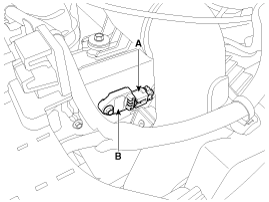
Disconnect the front impact sensor connector (A).
|
| 4. |
Remove the front impact sensor mounting nut (B).
|
| • |
Do not turn the ignition switch ON and do not contact the battery
cable while replacing the front impact sensor.
|
|
| 1. |
Install the new front impact sensor.
|
| 2. |
Tighten the front impact sensor mounting nut.
|
Tightening torque :
6.8 ~ 7.9 N.m (0.7 ~ 0.8 kgf.m, 5.0 ~ 5.8 lb-ft)
|
|
| 3. |
Connect the front impact sensor connector.
|
| 4. |
Left side - Install the head lamp assembly.
(Refer to Body electrical - "Head Lamps")
Right side - Install the washer reservoir.
(Refer to Body electrical - "Front washer motor")
|
| 5. |
Reconnect the battery negative cable.
|
| 6. |
After installing the Front Impact Sensor, confirm proper system operation:
| • |
Turn the ignition switch ON; the SRS indicator light should
be turned on for about six seconds and then go off.
|
|
Description
The Side Impact Sensor (SIS) system consists of two front SIS which are installed
inside the Center Pillar (LH and RH). They are remote sensors that detect acceleration ...
Other information:
Kia Cee'd JD Service Manual: Repair procedures
Inspection
Steering Wheel Play Inspection
1.
Turn the steering wheel so that the front wheels can face straight ahead.
2.
Measure the distance the steering wheel can be turned without moving
the front wheels.
...
Kia Cee'd JD Owners Manual: Starting the gasoline engine
1.Carry the smart key or leave it inside
the vehicle.
2.Make sure the parking brake is firmly
applied.
3.Manual Transaxle - Depress the
clutch pedal fully and shift the
transaxle into Neutral. Keep the clutch
pedal and brake pedal depressed
while starting the engine.
Automatic transax ...


 Front Impact Sensor (FIS) Components and components location
 Side Impact Sensor (SIS) Description and operation