
Kia Cee'd: Manual heating and air conditioning / Fan speed control
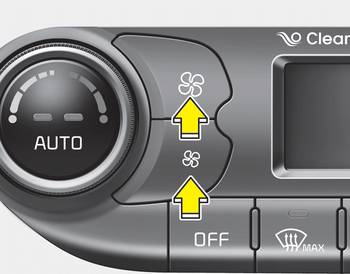
The fan speed can be set to the desired speed by pressing the fan speed control button.
To change the fan speed, press the upper
button ( ) for higher speed, or press
the lower button (
) for higher speed, or press
the lower button ( ) for lower speed.
Pressing the OFF button turns off the
fan.
) for lower speed.
Pressing the OFF button turns off the
fan.
 Air intake control
This is used to select the outside (fresh)
air position or recirculated air position.
To change the air intake control position,
push the control button.
Recirculated air position
With the ...
 Air conditioning
Press the A/C button to turn the air conditioning
system on (indicator light will
illuminate).
Press the button again to turn the air
conditioning system off. ...
Other information:
Kia Cee'd JD Service Manual: Oil Pump Repair procedures
Removal and Installation
1.
Remove the timing chain cover.
(Refer to Timing System - "Timing Chain Cover")
2.
Remove the pump cover (A).
Tightening torque :
8.8 ~ 13.7N.m (0.9 ...
Kia Cee'd JD Service Manual: Repair procedures
Component Replacement After
Deployment
Before doing any SRS repairs, use the GDS to check for DTCs. Refer to
the Diagnostic Trouble Code list for repairing of the related DTCs.
When ...
