
Kia Cee'd: Emergency Call System / Emergency Call (eCall) Button Components and components location
Kia Cee'd JD Service Manual / Body Electrical System / Emergency Call System / Emergency Call (eCall) Button Components and components location
| Component |
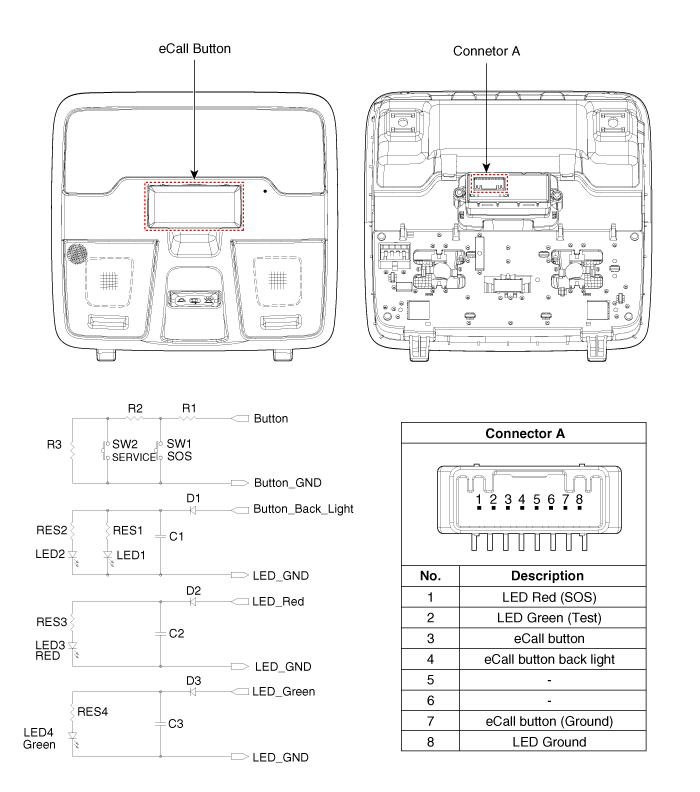
 Emergency Call (eCall) Unit Repair procedures
Removal
Carry out the Test Mode in the following cases.
–
Replacing the eCal ...
 Emergency Call (eCall) Button Repair procedures
Removal
1.
Disconnect the negative (-) battery terminal.
2.
Remove the overhead console lamp.
(Refer to Lighting System - " ...
Other information:
Kia Cee'd JD Service Manual: Clutch Actuator Motor 1 (Odd Gear) Description and operation
Description
The clutch actuator motor is mounted on the Dual Clutch Transmission(DCT).
The clutch actuator motor comprises an actuator motor that controls the odd
clutch and an actuator motor that controls the even clutch.
The odd actuator motor receives signals from th ...
Kia Cee'd JD Service Manual: Repair procedures
Removal
1.
Separate the push rod (C) after remove the pin (A) and washer (B).
2.
Remove the battery and battery tray.
G 1.6 MPI (Refer to Engine Electrical System - "Battery")
G 1.4 MPI (Refer to E ...
© 2017-2026 www.kceed.com
