
Kia Cee'd: Charging System / Description and operation
Kia Cee'd JD Service Manual / Engine Electrical System / Charging System / Description and operation
| Description |
The charging system included a battery, an alternator with a built-in regulator,
and the charging indicator light and wire.
The Alternator has eight built-in diodes, each rectifying AC current to DC current.
Therefore, DC current appears at alternator "B" terminal.
In addition, the charging voltage of this alternator is regulated by the battery
voltage detection system.
The alternator is regulated by the battery voltage detection system. The main
components of the alternator are the rotor, stator, rectifier, capacitor brushes,
bearings and V-ribbed belt pulley. The brush holder contains a built-in electronic
voltage regulator.
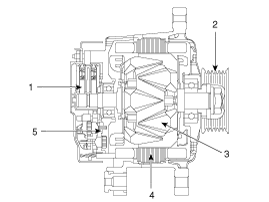
| 1. Brush 2. Drive belt pulley 3. Rotor 4. Stator 5. Rectifier |
| Alternator Management System |
Alternator management system controls the charging voltage set point in order
to improve fuel economy, manage alternator load under various operating conditions,
keep the battery charged, and protect the battery from over-charging. ECM controls
generating voltage by duty cycle (charging control, discharging control, normal
control) based on the battery conditions and vehicle operating conditions.
The system conducts discharging control when accelerating a vehicle. Vehicle
reduces an alternator load and consumes an electric power form a battery.
The system conducts charging control when decelerating a vehicle. Vehicle increases
an alternator load and charges a battery.
 Charging System
...
 Repair procedures
On-vehicle Inpection
•
First of all, check for DTCs. If a DTC is present, perform tro ...
Other information:
Kia Cee'd JD Service Manual: Special service tools
Special Service Tools
Tool (Number and Name)
Illustration
Use
09561-11001
Steering wheel puller
Remove the steering wheel
09568-34000
Ball joint puller
...
Kia Cee'd JD Owners Manual: Weight of the trailer
What is the maximum safe weight of a
trailer? It should never weigh more than
the maximum trailer weight with trailer
brakes. But even that can be too heavy.
It depends on how you plan to use your
trailer. For example, speed, altitude, road
grades, outside temperature and how
often yo ...
© 2017-2026 www.kceed.com
