
Kia Cee'd: Charging System / DC DC Converter Repair procedures
Kia Cee'd JD Service Manual / Engine Electrical System / Charging System / DC DC Converter Repair procedures
| Removal |
| 1. |
Disconnect the battery negative terminal.
|
| 2. |
Remove the glove box housing.
(Refer to Body - "Glove Box Housing")
|
| 3. |
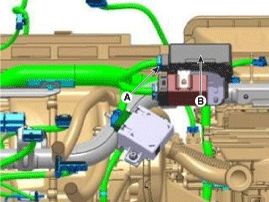
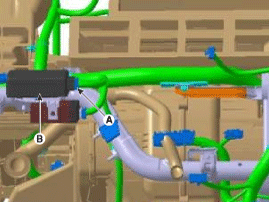
Disconnect the DC/DC converter conector (A).
|
| 4. |
Remove the DC/DC converter (B) after removing nuts.
[LHD]
[RHD]
|
| Installation |
| 1. |
Install in the reverse order of removal.
|

 DC DC Converter Schematic diagrams
Circuit Diagram
...
 Battery Description and operation
Description
1.
The MF(Maintenance Free) battery is, as the name implies, totally maintenance
free and has no removable battery cell caps.
2.
...
Other information:
Kia Cee'd JD Service Manual: Muffler Components and components location
Components
1.
Front muffler
2. Gasket
3.
Hanger
4. Center & main muffler
...
Kia Cee'd JD Service Manual: General information
The Micro 570 Analyzer
The Micro 570 Analyzer provides the ability to test the charging and starting
systems, including the battery, starter and alternator.
※ Because of the possibility of personal inju ...
© 2017-2026 www.kceed.com
