
Kia Cee'd: Crash Pad / Crash Pad Center Panel Components and components location
Kia Cee'd JD Service Manual / Body (Interior and Exterior) / Crash Pad / Crash Pad Center Panel Components and components location
| Component Location |
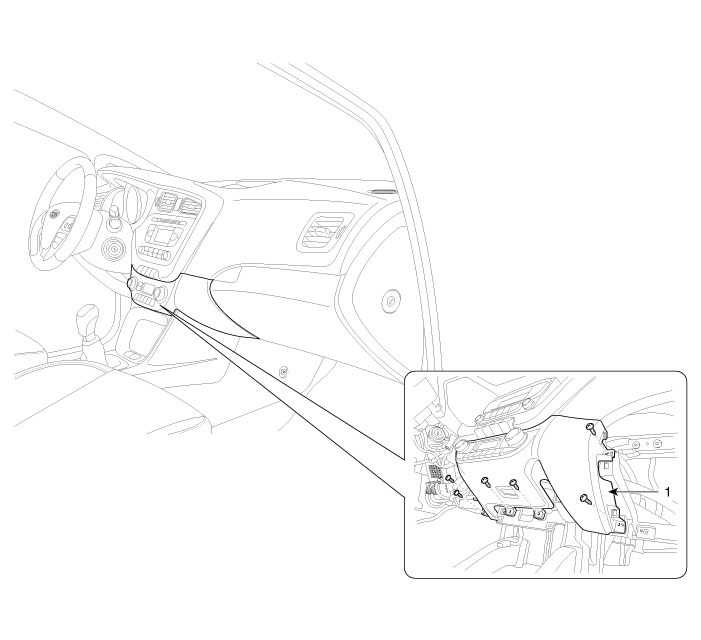
| 1. Crash pad center lower panel
|
 Glove Box Housing Repair procedures
Replacement
•
When prying with a flat-tip screwdriver, wrap it with protective
...
 Crash Pad Center Panel Repair procedures
Replacement
•
When prying with a flat-tip screwdriver, wrap it with protective
...
Other information:
Kia Cee'd JD Service Manual: High Mounted stop lamp Repair procedures
Removal
1.
Disconnect the negative (-) battery terminal.
2.
Remove the rear spoiler assembly (A).
(Refer to Body - "Rear Spoiler")
3.
Remove the high mounted stop lamp (A) after ...
Kia Cee'd JD Service Manual: Engine Control Module (ECM) Repair procedures
Removal
When replacing the ECM, the vehicle equipped with the immobilizer must
be performed procedure as below.
[In the case of installing used ECM]
1) Perform "ECM Neutral mode" ...
© 2017-2026 www.kceed.com
