Kia Cee'd: Interior Trim / Cowl Side Trim Repair procedures
| • |
Put on gloves to protect your hands.
|
|
| • |
Use a plastic panel removal tool to remove interior trim pieces
to protect from marring the surface.
|
| • |
Take care not to bend or scratch the trim and panels.
|
|
| 1. |
Remove the front door scuff trim.
(Refer to Interior Trim - "Door Scuff Trim")
|
| 2. |
Remove the hood latch release handle.
(Refer to Hood - "Hood Latch Release Handle")
|
| 3. |
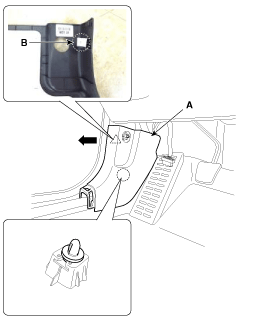
Using a screwdriver or remover, remove the cowl side trim (A).
| •
|
Be careful not to damage the cowl side trim clip (B).
|
| •
|
Pull the cowl side tirm as direction of the arrow and
then remove the tirm.
|
|
|
| 4. |
Install in the reverse order of removal.
| •
|
Replace any damaged clips.
|
|
|
Component Location
1. Cowl side trim
...
Component Location
1. Front pillar trim
...



 Cowl Side Trim Components and components location
 Front Pillar Trim Components and components location