Kia Cee'd: Floor Console / Console Armrest Repair procedures
| • |
When prying with a flat-tip screwdriver, wrap it with protective
tape, and apply protective tape around the related parts, to
prevent damage.
|
| • |
Put on gloves to protect your hands.
|
|
| • |
Take care not to scratch the body surface.
|
|
| 1. |
Remove the rear console cover.
(Refer to Floor Console - "Rear Console Cover")
|
| 2. |
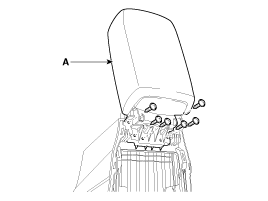
After loosening the mounting screws, then remove the console armrest
(A).
|
| 3. |
Install in the reverse order of removal.
| •
|
Replace any damage clips.
|
|
|
Component Location
1. Console armrest
...
Other information:
: How Does Blind Spot Information System Work. Blind Spot Information System Precautions. Blind Spot Information System Limitations
How Does Blind Spot Information System Work
Blind spot information system uses
sensors on both sides of your vehicle,
detecting rearward from the exterior
mirrors to approximately 13 ft (4 m)
beyond the rear bumper. The detection
area extends to approximately 59 ft (18 m)
beyond the rear bumpe ...
: MyKey Settings
Non-Configurable MyKey Settings
Seatbelt Reminder or Belt-Minder™
MyKey mutes the audio system until the
front seat passengers buckle the front seat
belts.
Note: If your vehicle includes an AM/FM
radio or a very basic audio system, then the
radio may not mute.
Satellite Radio (If Equipped)
Som ...



 Console Armrest Components and components location
 Crash Pad