
Kia Cee'd: Troubleshooting / Condenser Repair procedures
Kia Cee'd JD Service Manual / Heating,Ventilation, Air Conditioning / Troubleshooting / Condenser Repair procedures
| Inspection |
| 1. |
Check the condenser fins for clogging and damage. If clogged, clean
them with water, and blow them with compressed air. If bent, gently
bend them using a screwdriver or pliers.
|
| 2. |
Check the condenser connections for leakage, and repair or replace it,
if required.
|
| Replacement |
| 1. |
Recover the refrigerant with a recovery/recycling/charging station.
|
| 2. |
Disconnect the negative (-) battery terminal.
|
| 3. |
Remove the front bumper cover.
(Refer to Body - "Front Bumper Cover")
|
| 4. |
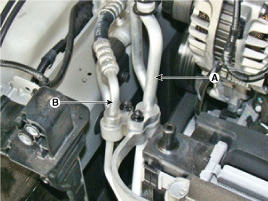
Disconnect the discharge line (A) and liquid line (B) from the condenser.
|
| 5. |
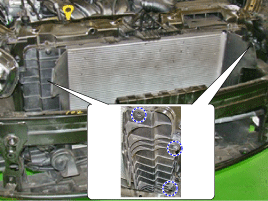
Remove the air guard (A).
|
| 6. |
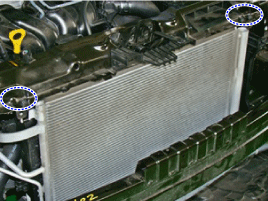
Remove the radiator upper mounting bracket bolts (A).
|
| 7. |
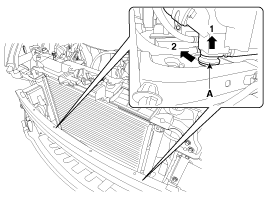
Remove the radiator lower mounting insulator(A).
|
| 8. |
Remove the condenser (A) from the radiator.
|
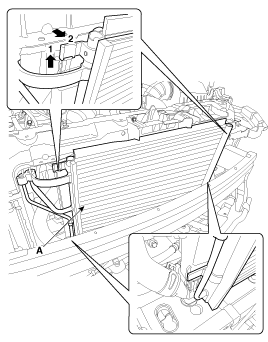
| 9. |
Installation is the reverse order of removal.
|

 Compressor Repair procedures
Removal
1.
If the compressor is marginally operable, run the engine at idle speed,
and let the air conditioning work for a few minutes, then shut the engine
...
 Receiver-Drier Repair procedures
Replacement
1.
Remove the condenser.
2.
Remove the cap (B) on the bottom of the condenser with a L wrench (A).
...
Other information:
Kia Cee'd JD Service Manual: ABS Control Module Repair procedures
Removal [LHD]
1.
Turn the ignition switch OFF.
2.
Pull up the lock of the HECU connector (A), and then disconnect the
connector.
3.
Remove the brake fluid from the master cylinder reservoir wi ...
Kia Cee'd JD Owners Manual: Disc brakes wear indicator
When your brake pads are worn and new
pads are required, you will hear a highpitched
warning sound from your front
brakes or rear brakes. You may hear this
sound come and go or it may occur
whenever you depress the brake pedal.
Please remember that some driving conditions
or climates ma ...
© 2017-2026 www.kceed.com
