
Kia Cee'd: Blind Spot Detection system / Components and components location
Kia Cee'd JD Service Manual / Body Electrical System / Blind Spot Detection system / Components and components location
| Components |
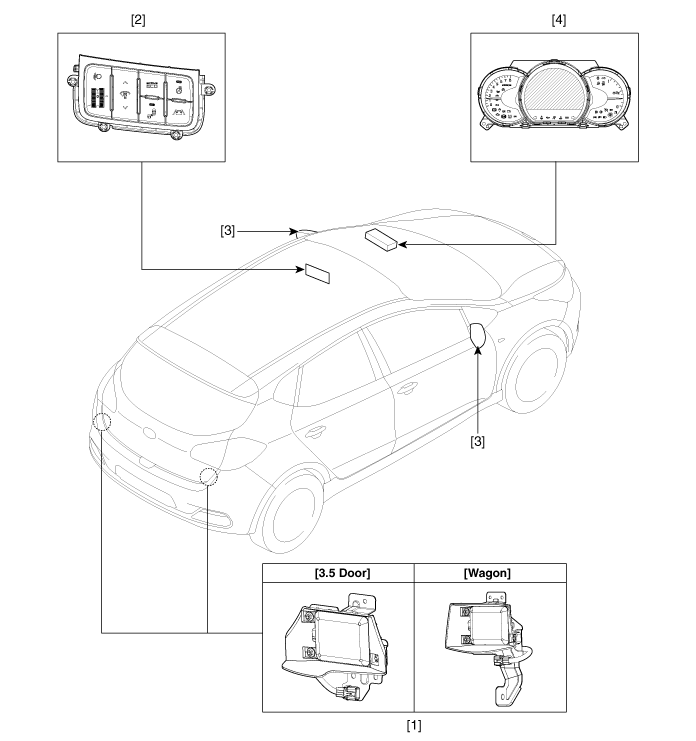
| 1. Blind Spot Detection (BSD)
Unit 2. BSD switch |
3. BSD warning lamp 4. Cluster |
 Specifications
Specifications
Items
Specification
Rated voltage
DC 12V
Operating voltage
9V ~ 16V
...
 Description and operation
Description
BSD is a system that uses two magnetic wave radar sensors attached on the rear
panel to measure the distance from the following vehicles and provides the sensing
...
Other information:
Kia Cee'd JD Service Manual: Rear Console Cover Repair procedures
Replacement
•
When prying with a flat-tip screwdriver, wrap it with protective
tape, and apply protective tape around the related parts, to
prevent damage.
...
Kia Cee'd JD Owners Manual: Good driving practices
Never take the vehicle out of gear and
coast down a hill. This is extremely
hazardous. Always leave the vehicle in
gear.
Don't "ride" the brakes. This can cause
them to overheat and malfunction.
Instead, when you are driving down a
long hill, slow down and shift to a lower
...
© 2017-2026 www.kceed.com
