
Kia Cee'd: Dual Clutch Transmission Control System / Clutch Actuator Motor 2 (Even Gear) Repair procedures
Kia Cee'd JD Service Manual / Dual Clutch Transmission(DCT) System / Dual Clutch Transmission Control System / Clutch Actuator Motor 2 (Even Gear) Repair procedures
| Inspection |
| 1. |
Turn off the ignition switch.
|
| 2. |
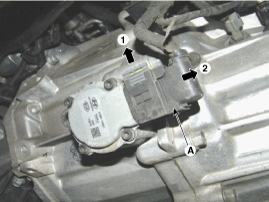
Disconnect the clutch motor connector (A).
|
| 3. |
Measure the resistance on the clutch motor terminal.
|
| 4. |
Refer to the specifications and check that the measured resistance is
as specified.
(Refer to Clutch Actuator Motor 2 - "Specification")
|
| Removal |
| 1. |
Turn off the ignition switch and then disconnect the battery (-) cable.
|
| 2. |
Remove the air cleaner assembly and air duct.
(Refer to Engine Mechanical System - "Air cleaner")
|
| 3. |
Remove the battery and battery tray.
(Refer to Engine Electrical System - "Battery")
|
| 4. |
Remove the ECM.
(Refer to Fuel System - "Engine Control Module (ECM)")
|
| 5. |
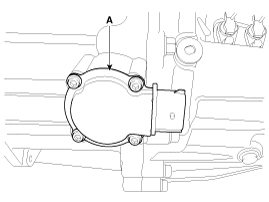
Disconnect the clutch actuator motor connector (A).
|
| 6. |
Loosen the mounting screw, and then remove the clutch actuator motor
(A).
|
| Installation |
| 1. |
Install in the reverse order of removal.
|

 Clutch Actuator Motor 2 (Even Gear) Schematic diagrams
Schematic Diagrams
...
 Gear Actuator Motor Description and operation
Description
The gear actuator motor is mounted on the complete shaft.
The gear actuator motor comprises the shift motor and select motor.
The gear actuator shift motor and se ...
Other information:
Kia Cee'd JD Owners Manual: How does the air bag system
operate
Air bags are activated (able to inflate if
necessary) only when the ignition
switch is turned to the ON or START
position.
Air bags inflate instantly in the event of
serious frontal or side collision (if
equipped with side impact air bag or
curtain air bag) in order to help pr ...
Kia Cee'd JD Service Manual: Shift Cable Components and components location
Components
1. Shift lever assembly
2. Shift cable assembly
3. Retainer
4. Bolt
5. Nut
6. Manual control lever
7. Knob
...
© 2017-2026 www.kceed.com
