
Kia Cee'd: Blind Spot Detection system (BSD) / BSD (Blind Spot Detection) / LCA (Lane Change Assist)
Kia Cee'd JD Owners Manual / Driving your vehicle / Blind Spot Detection system (BSD) / BSD (Blind Spot Detection) /
LCA (Lane Change Assist)
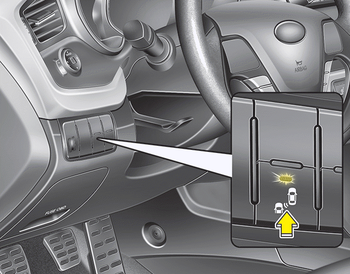
 Blind Spot Detection system (BSD)
The Blind Spot Detection System (BSD)
uses radar sensors in the rear bumper to
monitor and warn the driver of an
approaching vehicle in the driver's blind
spot area.
The system monitors the ...
 Operating conditions
To operate:
Press the BSD switch with the Ignition
switch in the ON position.
The indicator on the BSD switch will illuminate.
When the vehicle speed exceeds 30
km/h (20 mph), the system will ...
Other information:
Kia Cee'd JD Service Manual: Canister Repair procedures
Removal
1.
Turn the ignition switch OFF and disconnect the negative (-) battery
cable.
2.
Remove the fuel tank assembly.
(Refer to Fuel System - "Fuel Tank")
3.
Disconnect the vapor hos ...
Kia Cee'd JD Owners Manual: Rear window wiper and washer
switch
The rear window wiper and washer
switch is located at the end of the wiper
and washer switch lever. Turn the switch
to desired position to operate the rear
wiper and washer.
- Normal wiper operation
--- - Intermittent wipe
O - Wiper is not in operation
Push the lever away from you to ...
© 2017-2026 www.kceed.com
