
Kia Cee'd: Driving your vehicle / Blind Spot Detection system (BSD)
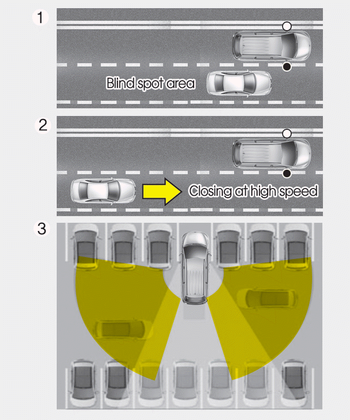
The Blind Spot Detection System (BSD) uses radar sensors in the rear bumper to monitor and warn the driver of an approaching vehicle in the driver's blind spot area.
The system monitors the rear area of the vehicle and provides information to the driver with an audible alert and a indicator on the outside rearview mirrors.
➀BSD (Blind Spot Detection) The blind spot detection range varies relative to vehicle speed. Note that if your vehicle is traveling much faster than the vehicles around you, the warning will not occur.
➁LCA (Lane Change Assist) The Lane Change Assist feature will alert you when a vehicle is approaching in an adjacent lane at a high rate of speed. If the driver activates the turn signal when the system detects an oncoming vehicle, the system sounds an audible alert. The time of alert varies according to the speed difference between you and the approaching vehicle.
➂RCTA (Rear Cross Traffic Alert) The Rear Cross Traffic Alert feature monitors approaching cross traffic from the left and right side of the vehicle when your vehicle is in reverse. The feature will operate when the vehicle is moving in reverse below about 10 km/h (6 mph). If oncoming cross traffic is detected a warning chime will sound. The time of alert varies according to the speed difference between you and the approaching vehicle.
WARNING
- Always be aware of road conditions while driving and be alert for unexpected situations even though the Blind Spot Detection System is operating.
- The Blind Spot Detection System (BSD) is not a substitute for proper and safe driving. Always drive safely and use caution when changing lanes or backing up the vehicle. The Blind Spot Detection System (BSD) may not detect every object alongside the vehicle.
- BSD (Blind Spot Detection) / LCA (Lane Change Assist)
- RCTA (Rear cross traffic alert)
- Driver’s Attention
 Driver's Attention
The driver must be cautious in the below
situations for the system may
not assist the driver and may not work
properly.
Do not stick or attach anything to the
windshield in front of the c ...

Other information:
: Automatic High Beam Control
How Does Automatic High Beam Control Work
Automatic high beam control turns the
high beams on if it is dark enough and no
other traffic is present. If it detects an
approaching vehicle’s headlamps or tail
lamps, or street lighting ahead, the system
turns the high beams off.
A camera sensor, c ...
: Charge Preferences
Touch the button to access Charge Time
and Departure Time settings. Once set up,
additional information and settings are
displayed on the charge settings screen.
Charge Times On and Off Switch
This switch is visible when your vehicle is
at a saved Charge Times location. Use the
switch to turn y ...
