
Kia Cee'd: Troubleshooting / Ambient Temperature Sensor Repair procedures
Kia Cee'd JD Service Manual / Heating,Ventilation, Air Conditioning / Troubleshooting / Ambient Temperature Sensor Repair procedures
| Inspection |
| 1. |
Turn the ignition switch OFF.
|
| 2. |
Disconnect the ambient temperature sensor.
|
| 3. |
Check the resistance of the ambient temperature sensor between terminal
“+” and “-” whether it is changed by changing of the ambient temperature.
Specification
|

| 4. |
If the measured resistance is not within specification, substitute with
a known-good ambient temperature sensor and check for proper operation.
|
| 5. |
If the problem is corrected, replace the ambient temperature sensor.
|
| Replacement |
| 1. |
Disconnect the negative (-) battery terminal.
|
| 2. |
Remove the front bumper cover.
(Refer to Body - "Front Bumper Cover")
|
| 3. |
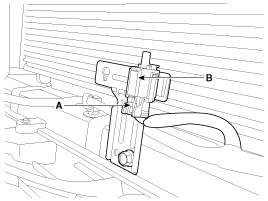
Disconnect the ambient temperature sensor connector (A).
|
| 4. |
Remove the ambient temperature sensor (B).
|
| 5. |
Install in the reverse order of removal.
|
 Ambient Temperature Sensor Description and operation
Description
The ambient temperature sensor is located at the front of the condenser and
detects ambient air temperature. It is a negative type thermistor; resistance
will increas ...
 Auto Defogging Sensor Description and operation
Description
The auto defogging sensor is installed on the front window glass. The sensor
judges and sends signal if moisture occurs to blow out wind for defogging. The
air condit ...
Other information:
: Keys and Remote Controls
Argentina
Brazil
Djibouti
Ghana
Jamaica
Jordan
Malaysia
F17000176
Mauritania
Moldova
Morocco
Pakistan
Paraguay
NR: 2016-9-I-000223
NR: 2016-9-I-000222
NR: 2016-9-I-000220
NR: 2018-07-I-000317
Serbia
Singapore
South Africa
South Korea
MSIP-CRM-TAL-A2C97102000
Taiwan, China
U ...
Kia Cee'd JD Owners Manual: Switching to Media Mode
Pressing the key will change
the operating mode in order of CD ➟
USB (iPod®) ➟ AUX ➟ My Music ➟
BT Audio.
If [Pop-up Mode] / [Mode Pop-up] is
turned on within [Display],
then pressing the key will display
the Media Pop-up Mode screen.
Turn the TUNE knob to move the
focus ...
© 2017-2026 www.kceed.com
