
Kia Cee'd: How the system works (Exit mode) / 3. Check surroundings
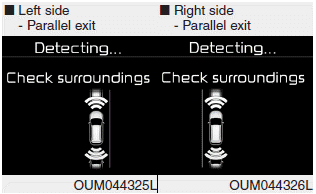
The Smart Parking Assist System checks the front and rear space to exit the vehicle from the parking space.
✽ NOTICE
- When checking surroundings, if the front or rear vehicle (or object) is too near, the system may not work properly.
- The system may not operate normally
in the following conditions:
(1) When the sensors are frozen
(2) When the sensors are dirty
(3) When it snows or rains heavily
(4) When a pillar or object is near - When exiting the parking space if an obstacle is detected that may cause an accident, the system may cancel.
- If the space is too small to exit the system may cancel.
CAUTION
- If searching surroundings is completed, continue using the system after checking the surrounding area.
- The Exit mode may be activated unintentionally, when the shift lever is in P (Park) or N (Neutral) if the Smart parking assist system button is pressed.
 2. Select Exit Mode
Select the mode by pressing the Smart
Parking Assist System button with the
shift lever in P (Park) or N (Neutral)
and the brake pedal depressed.
The left side parallel mode is selecte ...
 4. Steering wheel control
The above message will appear if the
shift lever is in D (Drive) or R (Reverse)
according to the distance of the front
and rear object from the sensor.
The steering wheel will be ...
Other information:
Kia Cee'd JD Owners Manual: Easy access function
The system will move the driver's seat
automatically as follows:
Without smart key system
- It will move the driver’s seat rearward
when the ignition key is removed and
front driver’s door is opened.
- It will move the driver’s seat forward
when the ignition key is inserted. ...
Kia Cee'd JD Service Manual: Troubleshooting
Troubleshooting
Symptom
Possible cause
Remedy
Hard steering
Improper front wheel alignment
Excessive turning resistance of lower arm ball joint
Low tire pressure
No power assist
Correct
...
