
Kia Cee'd: How the system works (Parking mode) / 1. Activate Smart Parking Assist System
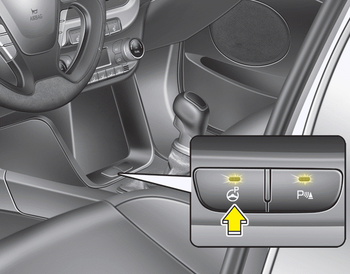
- Press the Smart Parking Assist System button (the button indicator will illuminate).
- The Parking Assist System will be activated (the button indicator will illuminate). A warning sound will be heard if an obstacle is detected.
- Press the Smart Parking Assist System button again for more than 2 seconds to turn off the system.
- The Smart Parking Assist System defaults to the OFF position whenever the ignition switch is turned on.
 How the system works
(Parking mode)
How the system works
(Parking mode)
1.Activate the Smart Parking Assist
System
The shift lever should be placed in D
(Drive) or N(Neutral).
2.Select parking assist mode
3.Search for parking space (slowly move
forward.)
4.Searc ...
 2. Select parking assist mode
Select the parking assist mode by pressing
the Smart Parking Assist System
button with the shift lever in N (Neutral)
or D(Drive) and the brake pedal
depressed. If the speed of the ve ...
Other information:
Kia Cee'd JD Owners Manual: Bluetooth® Wireless Technology
Setting
The Bluetooth® word mark and logos
are registered trademarks owned by
Bluetooth SIG, Inc. and any use of
such marks by Kia is under license.
Other trademarks and trade names
are those of their respective owners.
A Bluetooth® enabled cell phone is
required to use Bluetooth® Wireless ...
: Setting a Memory Preset. Muting the Audio. Adjusting the Sound Settings
Setting a Memory Preset
Select a station or channel.
Press and hold a memory preset button
on the touchscreen.
Note: The audio mutes briefly while the
system saves the preset and returns once it
is stored.
Note: You can save presets from multiple
sources to the memory preset bar.
Muting the ...
