
Kia Cee'd: Windshield Deicer / Windshield Deicer Switch Repair procedures
Kia Cee'd JD Service Manual / Body Electrical System / Windshield Deicer / Windshield Deicer Switch Repair procedures
| Inspection |
| 1. |
The windshield deicer switch inputs can be checked using the GDS.
|
| 2. |
To check the input value of windshield deicer switch, select option
"Body Control Module".
|
| 3. |
Select option "Current Data" of "smart junction box".
|
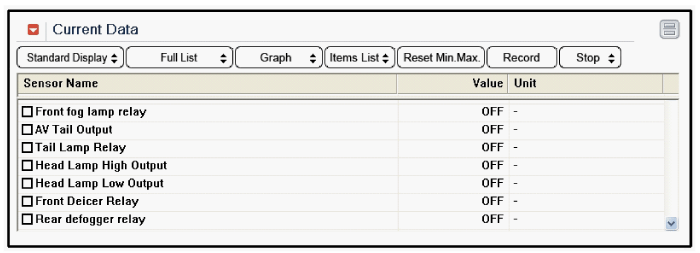
| 4. |
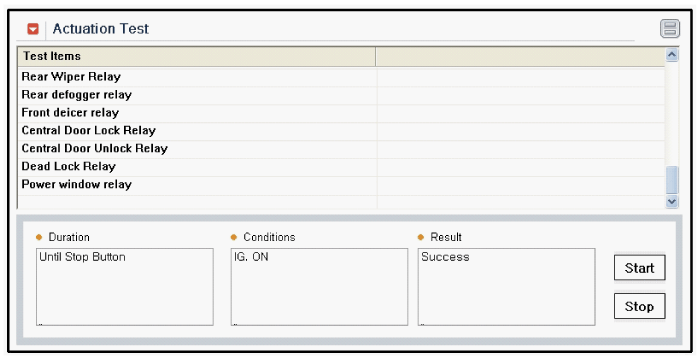
To check the input value of windshield deicer switch in force mode,
select option "Actuation Test" of "smart junction box".
|
| Removal |
| 1. |
Disconnect the negative (-) battery terminal.
|
| 2. |
Remove the heater and A/C controller after loosening screws.
(Refer to Heating,Ventilation, Air Conditioning - "Heater & A/C Control
Unit (MANUAL)")
(Refer to Heating,Ventilation, Air Conditioning - "Heater & A/C Control
Unit (DATC)")
|
| Installation |
| 1. |
Install the heater and A/C controller to the center fascia panel.
|
| 2. |
Connect the negative (-) battery terminal.
|
 Windshield Deicer Repair procedures
Inspection
1.
Remove the cowl top cover. (Refer to the wiper)
2.
Disconnect the windshield deicer connector (A) from the wiper motor
...

Other information:
Kia Cee'd JD Service Manual: Components and components location
Components
1. LDWS ON/OFF switch
2. Instrument cluster
3. LDWS unit
...
Kia Cee'd JD Owners Manual: Fuses
■ Blade type
■ Cartridge type
■ Multi fuse type
■ Battery fuse terminal (BFT)
A vehicle’s electrical system is protected
from electrical overload damage by
fuses.
This vehicle has 3 (or 4) fuse panels, one
located in the driver’s side panel bolster,
others in the eng ...
© 2017-2026 www.kceed.com
