
Kia Cee'd: Specifications & Consumer information / Vehicle identification number (VIN)
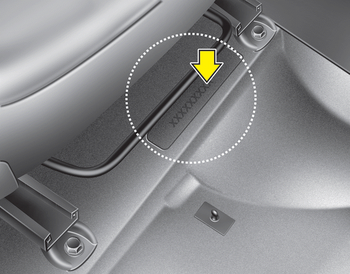
■ Frame number
The vehicle identification number (VIN) is the number used in registering your vehicle and in all legal matters pertaining to its ownership, etc.
The number is punched on the floor under the passenger seat. To check the number, open the cover.
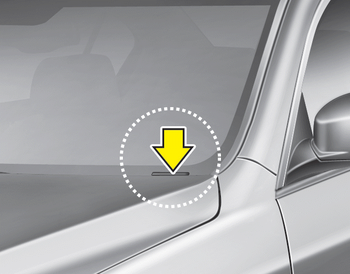
■ VIN label (if equipped)
The VIN is also on a plate attached to the top of the dashboard. The number on the plate can easily be seen through the windshield from outside.
 Recommended lubricants and capacities
To help achieve proper engine and powertrain performance and durability, use
only lubricants of the proper quality. The correct
lubricants also help promote engine efficiency that results in impro ...
 Vehicle certification label
The vehicle certification label attached
on the driver’s (or front passenger’s) side
center pillar gives the vehicle identification
number (VIN). ...
Other information:
Kia Cee'd JD Service Manual: Specifications
Specifications
Front Suspension
Item
Specification
Suspension type
MacPherson Strut
Shock absorber
Type
Gas
Rear Suspension
Item
...
Kia Cee'd JD Service Manual: Rear Cross Member Repair procedures
Replacement
1.
Loosen the wheel nuts slightly.
Raise the vehicle, and make sure it is securely supported.
2.
Remove the rear wheel and tire (A) from rear hub.
Tightening torque:
88.2 ~ 1 ...
