
Kia Cee'd: Features of your vehicle / Theft-alarm system

Vehicles equipped with a theft alarm system will have a label attached to the vehicle with the following words:
1.WARNING
2. SECURITY SYSTEM
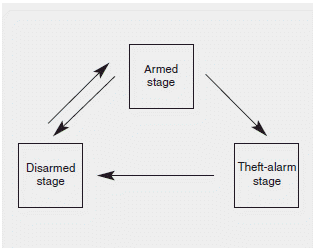
This system is designed to provide protection from unauthorized entry into the vehicle. This system is operated in three stages: the first is the "Armed" stage, the second is the "Theft-alarm" stage, and the third is the "Disarmed" stage. If triggered, the system provides an audible alarm with blinking of the hazard warning lights.
 Door lock/unlock in an emergency
situation
Door lock/unlock in an emergency
situation
If the smart key does not operate normally,
you can lock or unlock the doors by
using the mechanical key.
1.Press and hold the release button (1)
and remove the mechanical key (2).
2.Insert ...
 Armed stage
...
Other information:
Kia Cee'd JD Service Manual: Specifications
Specifications
Item
Specifications
Working voltage
DC
12V
Operating force
14.7 ± 2.9N
(1.5 ± 0.3kg, 3.3 ± 0.7lb)
Voltage drop
-0.4V
...
Kia Cee'd JD Service Manual: General information
The Micro 570 Analyzer
The Micro 570 Analyzer provides the ability to test the charging and starting
systems, including the battery, starter and alternator.
※ Because of the possibility of personal inju ...
