
Kia Cee'd: Heater / Temperature Control Actuator Repair procedures
| Inspection |
| 1. |
Turn the ignition switch OFF.
|
| 2. |
Disconnect the temperature control actuator connector.
|
| 3. |
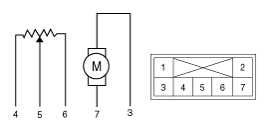
Verify that the temperature control actuator operates to the warm position
when connecting 12V to terminal 3 and grounding terminal 4.
Verify that the temperature control actuator operates to the cool position
when connected in reverse.
|
| 4. |
Connect the temperature control actuator connector.
|
| 5. |
Turn the ignition switch ON.
|
| 6. |
Check the voltage between terminal 4 and 5.
Specification
It will feedback the current position of the actuator to the controls.
|
| 7. |
If the measured voltage is not specification, substitute with a known-good
temperature control actuator and check for proper operation.
|
| 8. |
If the problem is corrected, replace the temperature control actuator.
|
| Replacement |
| 1. |
Disconnect the negative (-) battery terminal.
|
| 2. |
Remove the crash pad lower panel.
(Refer to Body - "Crash Pad Lower Panel")
|
| 3. |
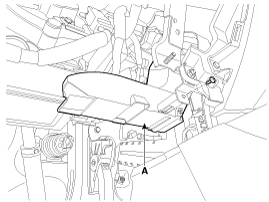
Remove the driver side shower duct (A) after loosening the screw.
|
| 4. |
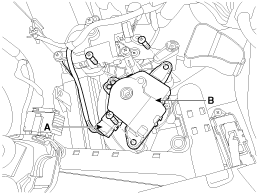
Disconnect the connector (A) and then remove the temperature control
actuator (B) after loosening the mounting screws.
|
| 5. |
Install in the reverse order of removal.
|
| 1. |
Disconnect the negative (-) battery terminal.
|
| 2. |
Remove the heater & blower assembly.
(Refer to Heater - "Heater Unit")
|
| 3. |
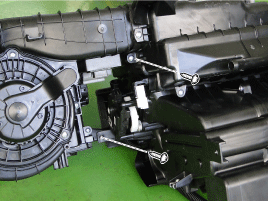
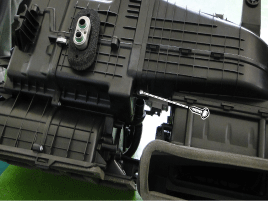
Separate the blower unit from the heater unit after loosening 3 screws.
|
| 4. |
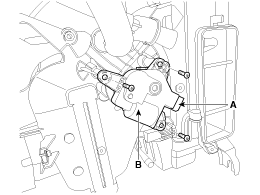
Disconnect the connector (A) and then remove the temperature control
actuator (B) after loosening the mounting screws.
|
| 5. |
Install in the reverse order of removal.
|
 Temperature Control Actuator Description and operation
Description
The heater unit includes mode control actuator and temperature control actuator.
The temperature control actuator is located at the heater unit. It regulates
the t ...
 Mode Control Actuator Description and operation
Description
The mode control actuator is located at the heater unit.
It adjusts the position of the mode door by operating the mode control actuator
based on signal of A/C cont ...
Other information:
Kia Cee'd JD Owners Manual: Headlight (Low, HID type),
Position light/DRL (LED type)
If the light does not operate, we recommend
that the system be checked by an
authorized Kia dealer.
WARNING - HID Headlight
low beam (if equipped)
Do not attempt to replace or
inspect the low beam (XENON bulb)
due to electric shock danger. If the
low beam (XENON bulb) is not
working, ...
Kia Cee'd JD Owners Manual: Tire rotation
To equalize tread wear, it is recommended
that the tires be rotated
every 12,000 km (7,500 miles) or
sooner if irregular wear develops.
During rotation, check the tires for
correct balance.
When rotating tires, check for uneven
wear and damage. Abnormal wear is
usually caused by incorr ...
