
Kia Cee'd: Storage compartment / Sliding armrest
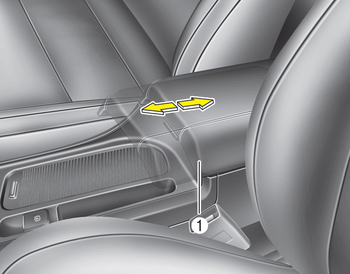
To move forward
Grab the front portion of the armrest (1) then pull it forward
To move rearward
Push the armrest rearward with your palm.
WARNING
Do not grab the front portion of the armrest (1) when moving the armrest rearward. It may pinch your fingers.
 Center console storage
To open the center console storage, push
the lever and then lift up the cover. ...
 Glove box
To open the glove box, push the button
and the glove box will automatically
open. Close the glove box after use.
WARNING
To reduce the risk of injury in an
accident or sudden stop, always
...
Other information:
: Using SYNC™ With Your Media Player
SYNC supports digital media sources
including: iPod, Bluetooth devices, and
most USB drives. SYNC also supports
audio formats, such as MP3, WMA, WAV
and ACC.
Media Sources
The AUX or MEDIA button allows you to
view and select available media sources.
Press the AUX or MEDIA button to view
your ...
Kia Cee'd JD Owners Manual: Heating
1. Set the mode to the position.
2. Set the air intake control to the outside
(fresh) air position.
3. Set the temperature control to the
desired position.
4. Set the fan speed control to the
desired speed.
5. If dehumidified heating is desired, turn
the air conditioning system on.
• ...
