
Kia Cee'd: Cruise Control System / Schematic diagrams
| System Block Diagram |
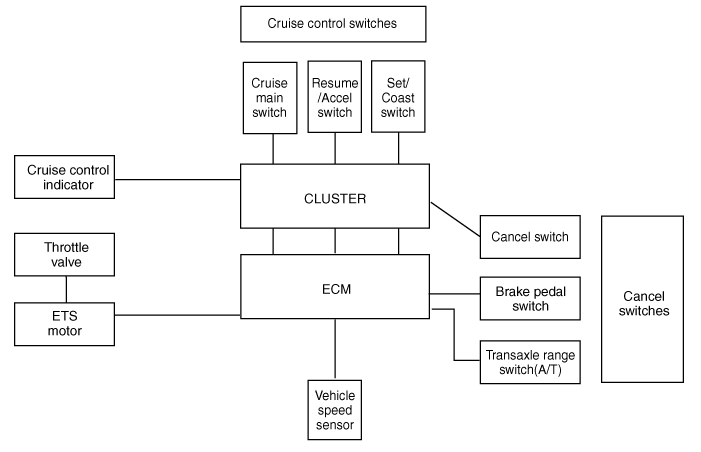
Component Parts And Function Outline
|
Component part |
Function |
|
|
Vehicle-speed sensor |
Converts vehicle speed to pulse. |
|
|
ECM |
Receives signals from sensor and control switches. |
|
|
Cruise control indicator |
Illuminate when CRUISE main switch is ON (Built into cluster) |
|
|
Cruise Control switches |
ON/OFF switch |
Switch for automatic speed control power supply. |
|
Resume/Accel switch |
Controls automatic speed control functions by Resume/Accel switch (Set/Coast
switch) |
|
|
Set/Coast switch |
||
|
Cancel switches |
Cancel switch |
Sends cancel signals to ECM. |
|
Brake-pedal switch |
||
|
Transaxle range switch (A/T) |
||
|
ETS motor |
Regulates the throttle valve to the set opening by ECM. |
|
* ETS : Electronic Throttle System
 Description and operation
Cruise Control
The cruise control system is engaged by the cruise "ON/OFF" main switch located
on right of steering wheel column. The system has the capability to cruise, ...
 Troubleshooting
Trouble Symptom Charts
Trouble Symptom 1
Trouble Symptom 2
Trouble symptom
Probable cause
Remedy
...
Other information:
Kia Cee'd JD Service Manual: Front Seat Belt Buckle Components and components location
Component Location
1. Front seat belt buckle
...
Kia Cee'd JD Service Manual: Steering Column Shroud Panel Repair procedures
Replacement
•
When prying with a flat-tip screwdriver, wrap it with protective
tape, and apply protective tape around the related parts, to
prevent damage.
...
© 2017-2026 www.kceed.com
