
Kia Cee'd: Keyless Entry and Burglar Alarm / Repair procedures
| Inspection |
| 1. |
Remove the front door trim.
(Refer to Body - "Front Door Trim")
|
| 2. |
Remove the front door module.
(Refer to Body - "Front Door Module")
|
| 3. |
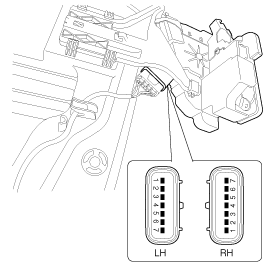
Disconnect the connector from the actuator.
|
| 4. |
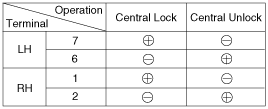
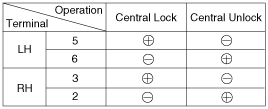
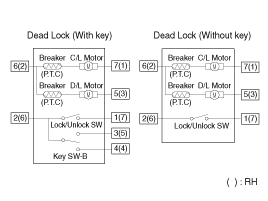
Check actuator operation by connecting power and ground according to
the table. To prevent damage to the actuator, apply battery voltage
only momentarily.
[Central Lock]
[Dead Lock]
|
| 5. |
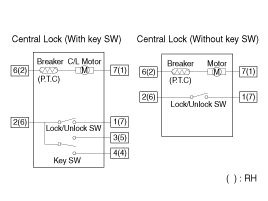
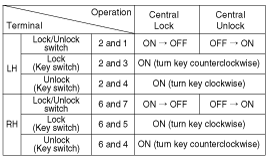
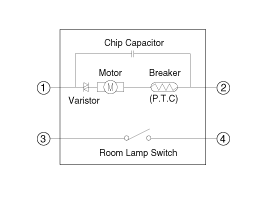
Check for continuity between the terminals in each switch position according
to the table.
[Central Lock]
|
| 1. |
Remove the rear door trim.
(Refer to Body - "Rear Door Trim")
|
| 2. |
Remove the rear door module.
(Refer to Body - "Rear Door Module")
|
| 3. |
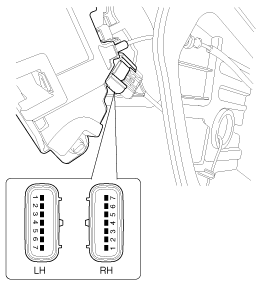
Disconnect the connector from the actuator.
|
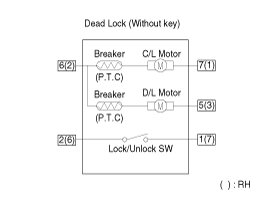
| 4. |
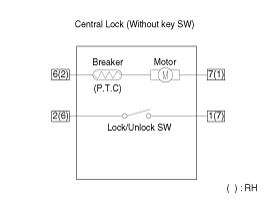
Check actuator operation by connecting power and ground according to
the table. To prevent damage to the actuator, apply battery voltage
only momentarily.
[Central Lock]
[Dead Lock]
|
| 5. |
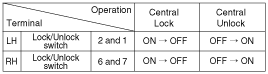
Check for continuity between the terminals in each switch position according
to the table.
[Central / Dead Lock]
|
| 1. |
Remove the tailgate trim.
(Refer to Body - "Tailgate Trim")
|
| 2. |
Disconnect the connector from the actuator.
|
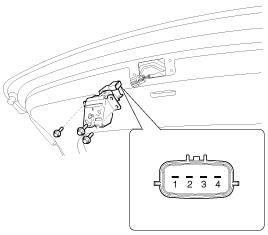
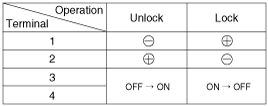
| 3. |
Check actuator operation by connecting power and ground according to
the table. To prevent damage to the actuator, apply battery voltage
only momentarily.
|
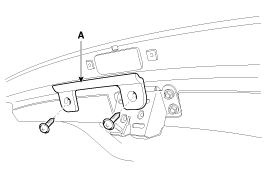
| 1. |
Remove the tailgate open switch bracket (A) after loosening screws.
|
| 2. |
Remove the switch and disconnect the connector from the switch.
|
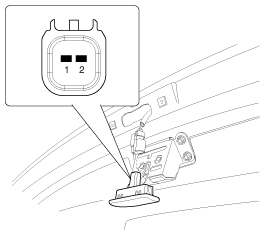
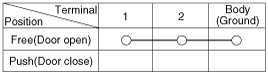
| 3. |
Check for continuity between the terminals in each switch position according
to the table.
|

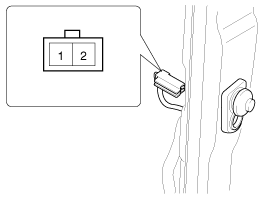
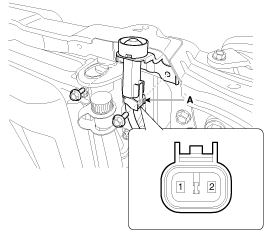
| 1. |
Disconnect the connector from the hood switch (A).
|
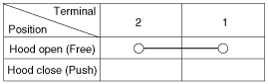
| 2. |
Check for continuity between the terminals and ground according to the
table.
|
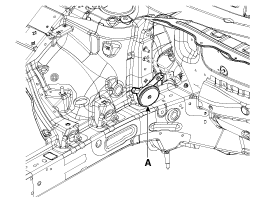
| 1. |
Remove the burglar horn (A) after removing 1 bolt and disconnect the
connector from the burglar horn.
|
| 2. |
Test the burglar horn by connecting battery power to the terminal 1
and ground the terminal 2.
|
| 3. |
The burglar horn should make a sound. If the burglar horn fails to make
a sound replace it.
|
 Description and operation
Description
Burglar Alarm State [B/A State]
B/A State
Description
DISARM
1)
In "DISARM ...
 Transmitter Specifications
Specification
Item
Description
Power source
3V
Operating temperature
-20°C ~ +60°C (-4°F ~ ...
Other information:
Kia Cee'd JD Service Manual: Start/Stop Button Repair procedures
Removal
1.
Disconnect the negative (-) battery terminal.
2.
Remove the crash pad center fascia panel.
(Refer to Body - "Center Fascia Panel")
3.
Disconnect the start/stop button connecto ...
Kia Cee'd JD Owners Manual: Rear parking assist system
The rear parking assist system assists
the driver during backward movement of
the vehicle by chiming if any object is
sensed within a distance of 120 cm (47
in.) behind the vehicle. This system is a
supplemental system and it is not intended
to nor does it replace the need for
extrem ...
