
Kia Cee'd: Rear Seat / Rear Seat Assembly Components and components location
Kia Cee'd JD Service Manual / Body (Interior and Exterior) / Rear Seat / Rear Seat Assembly Components and components location
| Component Location |
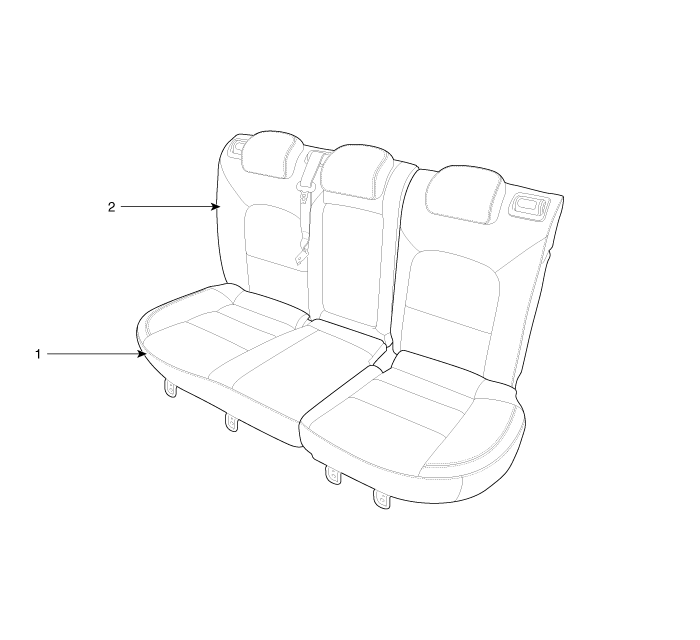
| 1. Rear seat cushion assembly
|
2. Rear seat back assembly
|
 Components and components location
Components (1)
[Rear seat back]
(5Door)
1. Rear seat headrest [LH]
2. Rear seat headrest [RH]
3. Rear seat headrest guide [LH]
...
 Rear Seat Assembly Repair procedures
Replacement
1.
After loosening the mounting bolts and then push it up and remove the
rear seat cushion assembly (A).
Tightening torque ...
Other information:
Kia Cee'd JD Service Manual: Repair procedures
Adjustment
Glass Adjustment
•
Check the glass run channel for damage or deterioration, and
replace them if necessary.
1.
Remove ...
Kia Cee'd JD Service Manual: General safety information and caution
Precautions
General Precautions
Please read the following precautions carefully before performing the airbag
system service.
Observe the instructions described in this manual, or the airbags could accidentally
deploy and cause damage or injuries.
• ...
© 2017-2026 www.kceed.com
