
Kia Cee'd: Floor Console / Rear Console Cover Repair procedures
Kia Cee'd JD Service Manual / Body (Interior and Exterior) / Floor Console / Rear Console Cover Repair procedures
| Replacement |
|

|

| 1. |
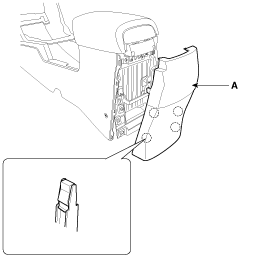
Using a screwdriver or remover, remove the rear console cover (A).
|
| 2. |
Install in the reverse order of removal.
|

 Rear Console Cover Components and components location
Component Location
1. Rear console cover
...
 Console Armrest Components and components location
Component Location
1. Console armrest
...
Other information:
Kia Cee'd JD Service Manual: ESP Control Module Repair procedures
Removal [LHD]
1.
Turn the ignition switch OFF.
2.
Pull up the lock of the HECU connector (A) , then disconnect the connector.
3.
Remove the brake fluid from the master cylinder reservoir with a ...
Kia Cee'd JD Service Manual: Shift Lever Repair procedures
Removal
1.
Remove the floor console assembly.
(Refer to Body - "Floor Console")
2.
Remove the air duct.
3.
Disconnect the control cable (A).
4.
Dis ...
© 2017-2026 www.kceed.com
