
Kia Cee'd: Front seat / Manual adjustment
Forward and backward
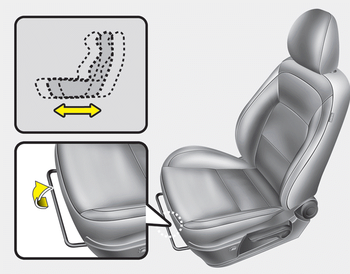
To move the seat forward or backward:
1. Pull the seat slide adjustment lever up and hold it.
2. Slide the seat to the position you desire.
3. Release the lever and make sure the seat is locked in place.
Adjust the seat before driving, and make sure the seat is locked securely by trying to move forward and backward without using the lever. If the seat moves, it is not locked properly.
Seatback angle
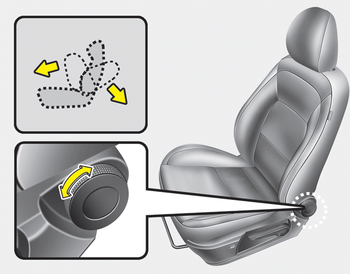
Turn the control knob forward or rearward to move the seatback to the desired angle.
Seat cushion height
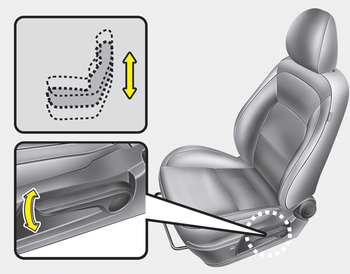
To change the height of the seat cushion, push the lever upwards or downwards.
- To lower the seat cushion, push down the lever several times.
- To raise the seat cushion, pull up the lever several times.
Lumbar support
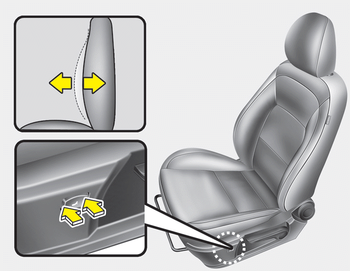
The lumbar support can be adjusted by pressing the lumbar support switch on the side of the seat.
1. Press the front portion of the switch to increase support, or the rear portion of the switch, to decrease support.
2. Release the switch once it reaches the desired position.
 Front seat
...
 Automatic adjustment
The driver’s seat can be adjusted by
using the control switches located on the
outside of the seat cushion. Before driving,
adjust the seat to the proper position
so as to easily control the ...
Other information:
: Tire Pressure Monitoring System Sensors - Vehicles With: 433 MHz Sensors
Argentina
Brazil
Djibouti
European Union EU
Ghana
Jordan
Mauritania
Mexico
Moldova
Morocco
Nigeria
Oman
Pakistan
Paraguay
NR: 2018-06-I-000224
Philippines
Russia
Serbia
Singapore
South Africa
South Korea
R-CRM-SRD-AG2SM4
Taiwan
Ukraine
United Arab Emirates (U.A.E.)
United Sta ...
Kia Cee'd JD Owners Manual: Turn signals and lane change signals
The ignition switch must be on for the
turn signals to function. To turn on the
turn signals, move the lever up or down
(A). Green arrow indicators on the instrument
panel indicate which turn signal is
operating.
They will self-cancel after a turn is completed.
If the indicator contin ...
