
Kia Cee'd: Timing System / Idler Repair procedures
| Removal and Installation |
| 1. |
Remove the drive belt.
(Refer to Timing System - "Dreve Belt")
|
| 2. |
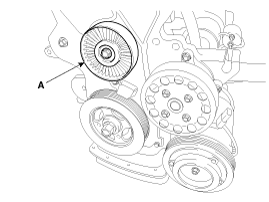
Remove the idler (A).
|
| 3. |
Install in the reverse order of removal.
|
 Idler Components and components location
Components
1. Idler
...
 Drive Belt Tensioner Components and components location
Components
1. Drive belt tensioner
...
Other information:
Kia Cee'd JD Service Manual: Electronic Parking Brake (EPB) Repair procedures
Removal
1.
Turn ignition OFF and disconnect the negative (-) battery cable.
2.
Remove the floor console assembly.
(Refer to Body - "Floor console assembly")
3.
Disconnect the EPB cont ...
Kia Cee'd JD Service Manual: Room Lamp Repair procedures
Inspection
Room Lamp
1.
Check that the switch operates properly after disconnecting the room
lamp connector (A).
Removal
Room Lamp
1.
Disconnect the negative(-) battery terminal.
...
© 2017-2026 www.kceed.com
