
Kia Cee'd: Controller / Heater & A/C Control Unit (MANUAL) Repair procedures
Kia Cee'd JD Service Manual / Heating,Ventilation, Air Conditioning / Controller / Heater & A/C Control Unit (MANUAL) Repair procedures
| Replacement |
|

| 1. |
Disconnect the negative (-) battery terminal.
|
| 2. |
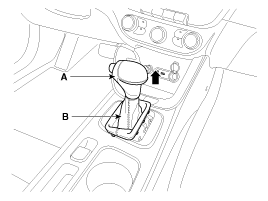
Remove the gear boots (B) and gear knob (A).
|
| 3. |
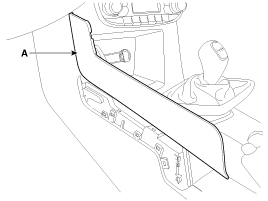
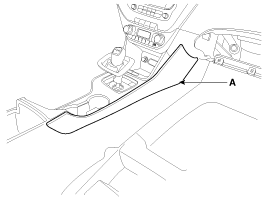
Using a screwdriver or remover, remove the console garnish (A).
[LH]
[RH]
|
| 4. |
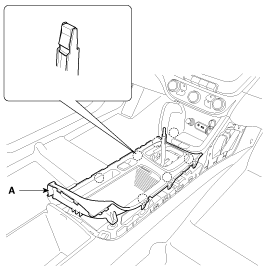
Using a screwdriver or remover, remove the console upper cover (A).
|
| 5. |
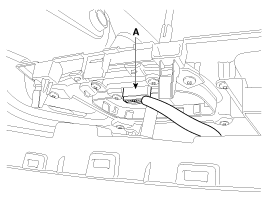
Disconnect the indicator connector (A).
|
| 6. |
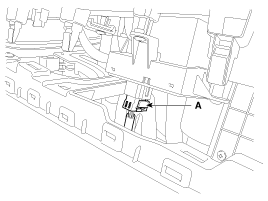
Disconnect the EPB switch connector (A).
|
| 7. |
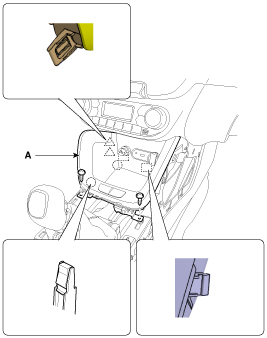
After loosening the mounting screws, then remove the console tray (A).
|
| 8. |
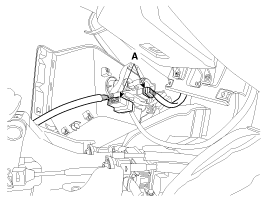
Disconnect the connectors (A).
|
| 9. |
Remove the crash pad lower panel.
(Refer to Body - "Crash Pad Lower Panel")
|
| 10. |
Remove the glove box housing.
(Refer to Body - "Glove Box Housing")
|
| 11. |
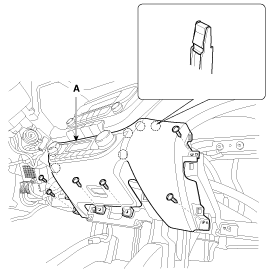
After loosening the mounting screws, then remove the crash pad center
lower panel (A).
|
| 12. |
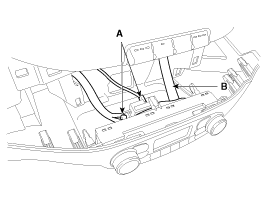
Disconnect the heater control unit connectors (A) and hose (B).
|
| 13. |
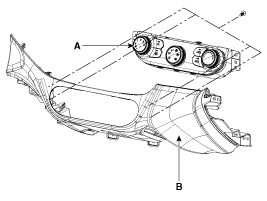
Remove the heater A/C controller (A) from the lower center facia panel
(B) after loosening the mounting screws.
|
| 14. |
Install in the reverse of removal.
|

 Heater & A/C Control Unit (MANUAL) Components and components location
Components
Connector Pin Function
Connector
Pin
No.
Gasoline
Diesel
Function
Fun ...
 Heater & A/C Control Unit (DATC) Components and components location
Components
Gasline
Connector Pin Function
Connector
Pin
No.
Function
Connector
Pin
No.
...
Other information:
Kia Cee'd JD Service Manual: Passenger Airbag (PAB) Module Description and operation
Description
The passenger airbag (PAB) is installed inside the crash pad and protects the
front passenger in the event of a frontal crash. The SRSCM determines if and
when to deploy the PAB.
Never atte ...
Kia Cee'd JD Owners Manual: Front fog light
Fog lights are used to provide improved
visibility when visibility is poor due to fog,
rain or snow, etc. The fog lights will turn
on when the fog light switch (1) is turned
on after the position light is turned on.
To turn off the fog lights, turn the fog light
switch (1) to the O (Off ...
© 2017-2026 www.kceed.com
