
Kia Cee'd: Hands Free System / Hands Free Switch Repair procedures
Kia Cee'd JD Service Manual / Body Electrical System / Hands Free System / Hands Free Switch Repair procedures
| Inspection |
| Type A |
| 1. |
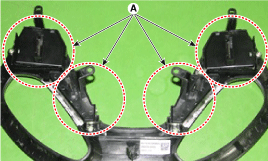
Check the audio remote control switch (A) for resistance between connector
3 and 4 in each switch position.
[Audio]
[Call + Voice]
[Cruise + Flex]
[Trip]
|
| Type B |
| 1. |
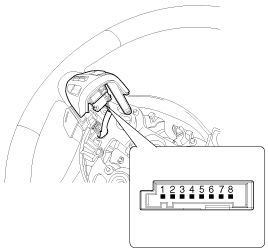
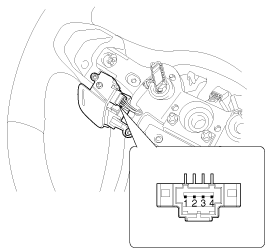
Check the hands free remote control switch for resistance between terminals
in each switch position.
[Audio/ Bluetooth]
[Voice recognition]
[Bluetooth]
[Voice recognition]
|
| Removal |
| 1. |
Remove the hands free switch.
(Refer to Audio - "Audio Remote Control")
|
| Installation |
| 1. |
Install the hands free switch.
(Refer to Audio - "Audio Remote Control")
|
 Hands Free Switch Schematic diagrams
Circuit Diagram
Type A
1. Remote control switch(LH:
Audio)
2. Remote control switch(RH: Cruise+Flex)
3. Bluetooth hands free switch
...
 Hands Free Mic Repair procedures
Inspection
1.
Disconnect the negative (-) battery terminal.
2.
Remove the roof trim assembly.
(Refer to Body - "Roof Trim ...
Other information:
Kia Cee'd JD Owners Manual: Necessary inspections
Fluid levels, such as engine oil, engine
coolant, brake fluid, and washer fluid
should be checked on a regular basis,
with the exact interval depending on the
fluid. Further details are provided in
chapter 7, “Maintenance”.
WARNING
Driving while distracted can result
in a loss of v ...
Kia Cee'd JD Owners Manual: Using the transmitter
Park the vehicle and stop the engine.
Arm the system as described below.
1.Turn off the engine and remove the
ignition key from the ignition switch.
2.Make sure that all doors, the engine
hood and tailgate are closed and
latched.
3.Lock the doors by pressing the lock
button on the trans ...
© 2017-2026 www.kceed.com
