
Kia Cee'd: Basic Service Symbols / General information
| Basic Service Symbols |
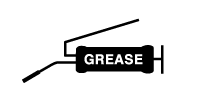
There are five primary symbols used to complement illustrations. These symbols
indicate the part to apply such materials during service.
|
Symbol |
Meaning |
|
|
Do not reuse the part. Replace a new one. |
|
|
Apply engine oil or transmission oil to the part. |
|
|
Apply automatic transmission fluid (ATF) to the part. |
|
|
Apply grease to the part. |
|
|
Apply sealant to the part. |





 Maintenance
...
Other information:
Kia Cee'd JD Service Manual: Sub Frame Repair procedures
Replacement
1.
Loosen the wheel nuts slightly.
Raise the vehicle, and make sure it is securely supported.
2.
Remove the front wheel and tire (A) from front hub.
Tightening torque :
88.2 ...
Kia Cee'd JD Service Manual: Starter Components and components location
Components
1. Screw
2. Front housing
3. Stop ring
4. Stopper
5. Overunn clutch
6. Lever
7. Lever plate
8. Lever packing
9. Magnet switch assembly
10. Armature
assembly
11. Yoke assembly
12. Brush (-)
13. Bru ...
© 2017-2026 www.kceed.com
