
Kia Cee'd: Your vehicle at a glance / Exterior overview (rear)
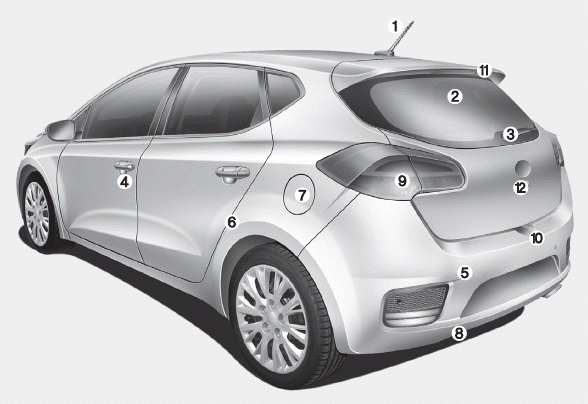
1. Roof antenna
2. Rear window defroster
3. Rear wiper
4. Door lock
5. Rear parking assist system
6. Child-protector rear door lock
7. Fuel filler
8. Rear towing hook
9. Rear combination lamp
10. Tailgate handle switch
11. High mounted stop lamp
12. Rearview camera
 Exterior overview (front)
1. Front removable towing hook
2. Front windscreen wiper
3. Outside rearview mirror
4. Door lock
5. Head lamp
6. Front fog lamp
7. Bonnet
8. Tyre and wheel ...
 Interior overview
1. Seat
2. Inside door handle
3. Power window switch
4. Power window lock button
5. Hood release lever
6. Outside rearview mirror folding
7. Outside rearview mirror control
8. Headlight level ...
Other information:
Kia Cee'd JD Service Manual: Puddle Lamp Repair procedures
Removal
1.
Disconnect the negative (-) battery terminal.
2.
Remove the mirror (A) from the mirror holder.
Be careful not to ...
Kia Cee'd JD Service Manual: Flex Steering Repair procedures
Inspection
1.
Check the audio remote control switch (A) for resistance between terminals
in each switch position.
Switch
Connector terminal
Resistance (±5%)
...
