
Kia Cee'd: Electro chromic Inside Rear View Mirror / Description and operation
Kia Cee'd JD Service Manual / Body Electrical System / Electro chromic Inside Rear View Mirror / Description and operation
| Description |
The ECM (Electro Chromatic inside rear view Mirror) is for dimming the reflecting
light from a vehicle behind at night, Preventing glare from the light. The forward
facing sensor detects brightness of the surroundings, while the rearward looking
sensor detects the strength of the reflecting light and adjusts the reflexibility
of the mirror in the range of 7~85%. But, when the reverse gear is engaged,
it stops functioning.
| 1. |
The forward facing sensor sees if the brightness of the surroundings
is low enough for the mirror to operate its function.
|
| 2. |
The rearward looking sensor detects glaring of the reflecting light
from a vehicle behind.
|
| 3. |
The ECM is darkened to the level as determined by the rearward looking
sensor. When the glaring is no longer detected, the mirror stops functioning.
1. LED indicator
2. ON/OFF Switch
3. Rearward looking sensor
4. Forward looking sensor
|
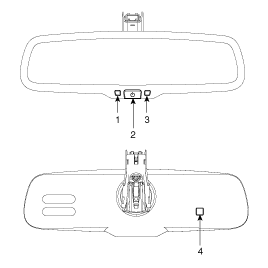
| Automatic-dimming Function |
To protect your vision during nighttime driving, your mirror will automatically
dim upon detecting glare from the vehicles traveling behind you. The auto-dimming
function can be controlled by the Dimming ON/OFF Button :
| 1. |
Pressing and holding the Feature Control button for more than 3 but
less than 6 seconds turns the auto-dimming function OFF which is indicated
by the green Status Indicator LED turning off.
|
| 2. |
Pressing and holding the Feature Control button again for more than
3 but less than 6 seconds turns the auto-dimming function ON which is
indicated by the green Status Indicator LED turning on.
|

 Components and components location
Components
...
 Repair procedures
Inspection
Check it by the procedure below to see if the function of the ECM is normal.
1.
Turn the ignition key to the "ON" position.
...
Other information:
Kia Cee'd JD Owners Manual: Malfunction indicator
The VSM can be deactivated even if you
don’t cancel the VSM operation by pressing
the ESC OFF button. It indicates that
a malfunction has been detected somewhere
in the EPS (Electronic Power
Steering) system or VSM system. If the
ESC indicator light () or EPS
warning
light remains ...
: Starting and Stopping the Engine – Troubleshooting
Starting and Stopping the Engine – Warning Lamps
Malfunction Indicator Lamp
If it illuminates when the
engine
is running, the on-board
diagnostics system is detecting
a malfunction of the vehicle emission
control system.
If it flashes, engine misfire could be
occurring. Increased exhaust ga ...
© 2017-2026 www.kceed.com
