
Kia Cee'd: Cooling System / Cooling Fan Repair procedures
Kia Cee'd JD Service Manual / Engine Mechanical System / Cooling System / Cooling Fan Repair procedures
| Removal and Installation |
| 1. |
Disconnect the battery negative terminal.
|
| 2. |
Remove the air cleaner assembly.
(Refer to Intake and exhaust system - "Air Cleaner")
|
| 3. |
Remove the battery tray.
(Refer to Engine Electrical System - "Battery")
|
| 4. |
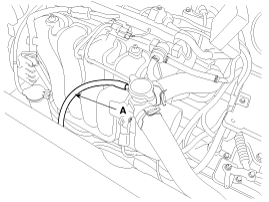
Disconnect the over flow hose (A) from the radiator.
|
| 5. |
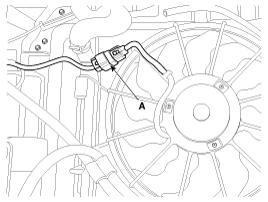
Disconnect the fan motor connector (A).
|
| 6. |
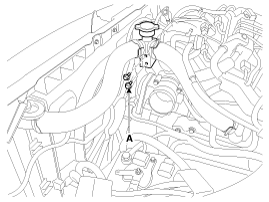
Remove the filler neck assembly bolts(A).
|
| 7. |
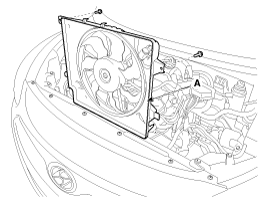
Remove the cooling fan assembly(A).
|
| 8. |
Installation is in the reverse order of removal.
|
 Cooling Fan Components and components location
Components
1. Cooling fan
2. Fan motor
3. Fan shroud
...
 Water Temperature Control Assembly Components and components location
Components
1. Water temperature control
assembly
2. Water temperature sensor
3. Gasket
4. Water
5. Bypass hose
...
Other information:
: Changing the Remote Control Battery - Vehicles With: Push Button Start
WARNING: Keep batteries away
from children to prevent ingestion.
Failure to follow this instruction could
result in personal injury or death. If
ingested, immediately seek medical
attention.
WARNING: If the battery
compartment does not securely close,
stop using the remote control and
replac ...
Kia Cee'd JD Service Manual: Components and components location
Components (1)
[5Door]
1. Front seat headrest
2. Front seat headrest guide
3. Front seat back cover
4. Front seat back warmer
5. Front seat back pad
6. Front seat back frame
7. Front seat lumber support
8. Front seat cushion ...
© 2017-2026 www.kceed.com
