
Kia Cee'd: Button Engine Start System / Components and components location
Kia Cee'd JD Service Manual / Body Electrical System / Button Engine Start System / Components and components location
| Component Location |
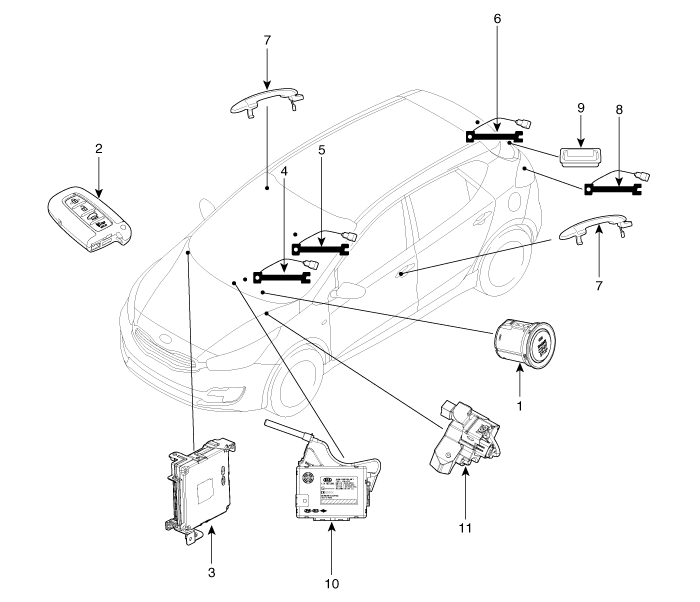
| 1. Start Stop Button (SSB)
2. FOB key 3. Smart key unit 4. Interior antenna 1 5. Interior antenna 2 6. Trunk antenna |
7. Door handle & door antenna
8. Bumper antenna 9. Tailgate open switch 10. BCM (Body Control Module) 11. ESCL (Electrical Steering Column Lock) |

 Schematic diagrams
Circuit Diagram
...
Other information:
Kia Cee'd JD Service Manual: Components and components location
Components
1. Parking brake lever
2. Parking brake cable
3. Equalizer assembly
...
Kia Cee'd JD Owners Manual: Components of the Tire Mobility Kit
1. Speed restriction label
2. Sealant bottle and label with
speed restriction
3. Filling hose from sealant bottle to
wheel
4. Connectors and cable for the battery
direct connection
5. Holder for the sealant bottle
6. Compressor
7. On/off switch
8. Pressure gauge for displaying the
t ...
© 2017-2026 www.kceed.com
