
Kia Cee'd: AVN System / Components and components location
| Components Location |
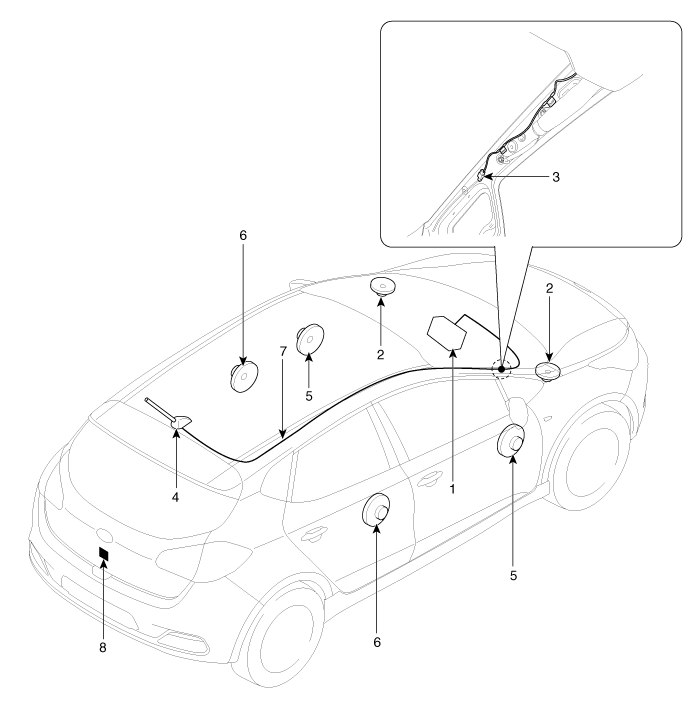
| 1. AVN (A/V & Navigation head
unit) 2. Tweeter speaker 3. Antenna cable connector 4. Roof antenna (GPS+Radio) |
5. Front door speaker 6. Rear door speaker 7. Antenna feeder cable 8. Rear camera |
 Specifications
Item
Specification
Power source
DC 14.4V (-) ground
Frequency range / Channel space
...
 Schematic diagrams
System Block Diagram
...
Other information:
Kia Cee'd JD Owners Manual: Selecting from the List
Turn the TUNE knob left/right to
search for the desired file.
Once you find the desired file, press
the TUNE knob to start playing.
Rewinding / Fast-forwarding Files
While playing, press and hold the
key (over 0.8 seconds) to
rewind or fast-forward the current file.
Scan
Press the ke ...
: Speed Sign Recognition Indicators. Setting the Speed Sign Recognition Speed Warning. Setting the Speed Sign Recognition Speed Tolerance
Speed Sign Recognition Indicators
When the system detects a speed limit
sign, it appears in the information display.
Setting the Speed Sign Recognition Speed Warning
To set the speed warning, use the
touchscreen.
Press Settings on the touchscreen.
Press Driver Assistance.
Press Speed Sign Rec ...
