
Kia Cee'd: Audio / Components and components location
| Component Location |
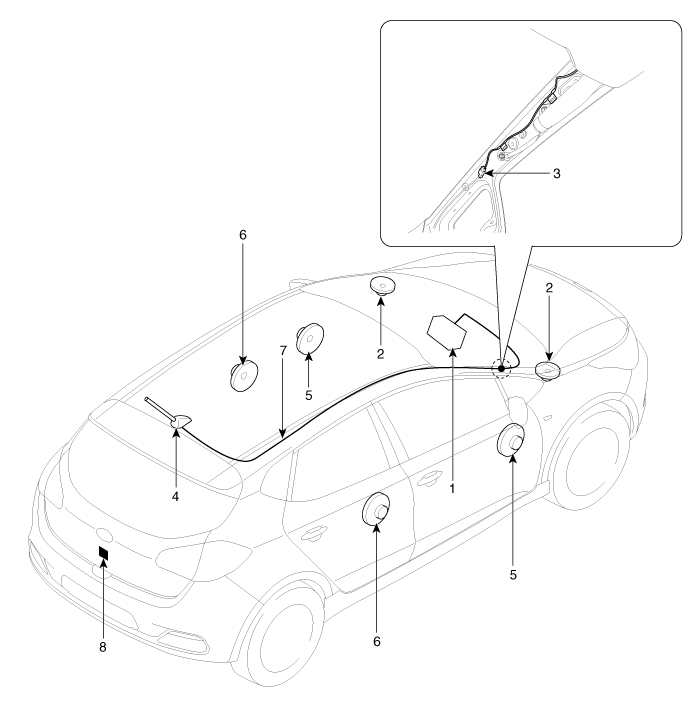
| 1. Audio unit 2. Tweeter speaker 3. Antenna cable connector 4. Roof antenna (Radio) |
5. Front door speaker 6. Rear door speaker 7. Antenna feeder cable 8. Rear camera |
 Specifications
Specification
Audio Unit
Item
Specification
Model
A type (RADIO/CDP/MP3/RDS)
B type (RADIO/CDP/MP3/RDS)
...
 Audio Unit Components and components location
Components
...
Other information:
Kia Cee'd JD Owners Manual: Non-operating condition
Never use the Smart Parking Assist
System in the below conditions.
Curved parking space
Inclined roads
A vehicle loaded with longer or wider
cargo compared to the vehicle
Diagonal parking space
Parking space with trash, grass or barriers
Heavy snow or rain
A pole close to the pa ...
Kia Cee'd JD Owners Manual: Auto defogging system
(Only for automatic climate control
system)
Auto defogging reduces the possibility of
fogging up the inside of the windshield by
automatically sensing the moisture of
inside the windshield.
The auto defogging system operates
when the climate control system is on.
✽ NOTICE
The auto defogging system may not
operate normally, wh ...
