
Kia Cee'd: Features of your vehicle / Automatic climate control system
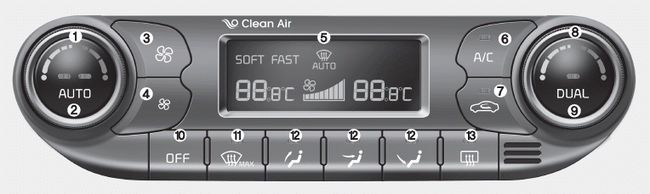
1. Driver's temperature control knob
2. AUTO (automatic control) button
3. Fan speed control button (Higher speed)
4. Fan speed control button (Lower speed)
5. Climate control display
6. Air conditioning button
7. Air intake control button
8. Passenger's temperature control knob
9. Dual temperature control selection button
10. OFF button
11. Front windshield defroster button
12. Mode selection button
13. Rear window defroster button
- Automatic heating and air conditioning
- Manual heating and air conditioning
- System operation
- Climate control air filter
- Checking the amount of air conditioner refrigerant and compressor lubricant
 Checking the amount of air conditioner
refrigerant and compressor
lubricant
Checking the amount of air conditioner
refrigerant and compressor
lubricant
When the amount of refrigerant is low,
the performance of the air conditioning is
reduced. Overfilling also has a bad influence
on the air conditioning system.
Therefore, if abnormal operation ...
 Automatic heating and air conditioning
The automatic climate control system is
controlled by simply setting the desired
temperature.
Soft mode
Fast mode
You can choose either the soft mode or
fast mode to select the fan speed. ...
Other information:
Kia Cee'd JD Service Manual: Inside Rear View Mirror Repair procedures
Replacement
[Manual Mirror]
1.
Loosen the inside rear view mirror mounting screw (C).
2.
Push the inside rear view mirror base (B) up to remove the inside rear
view mirror assembly (A).
3.
...
: Side Parking Aid - Vehicles With: Active Park Assist
What is the Side Parking Aid
The front and rear outermost parking aid
sensors map objects that are near to the
sides of your vehicle.
Side Parking Aid Limitations
The sensor coverage is up to 24 in (60 cm)
from the sides of your vehicle.
The side parking aid may not function if:
You switch your ...
