
Kia Cee'd: Troubleshooting / Auto Defogging Sensor Repair procedures
Kia Cee'd JD Service Manual / Heating,Ventilation, Air Conditioning / Troubleshooting / Auto Defogging Sensor Repair procedures
| Inspection |
To inspect and diagnose the sensor, refer to Self-Diagnosis procedure and DTC
guide.
| Replacement |
| 1. |
Disconnect the negative (-) battery terminal.
|
| 2. |
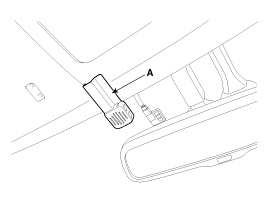
Remove the auto defogging sensor cover (A) by pulling it out.
|
| 3. |
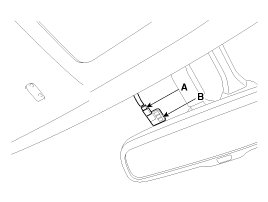
Disconnect the connector (A) and then remove the auto defogging sensor
(B).
|
| 4. |
Install in the reverse order of removal.
|
 Auto Defogging Sensor Description and operation
Description
The auto defogging sensor is installed on the front window glass. The sensor
judges and sends signal if moisture occurs to blow out wind for defogging. The
air condit ...
 Cluster Ionizer Description and operation
Description
The cluster ionizer makes disinfection and decomposition of bad smell from the
air-conditioner or inflow air. And it cleans the inside air of a vehicle.
When runni ...
Other information:
Kia Cee'd JD Owners Manual: Elapsed time
This mode indicates the total time traveled
since the last driving time reset.
Even if the vehicle is not in motion, the
driving time keeps going while the engine
is running.
The meter’s working range is from
0:00~99:59.
Pressing the button for more
than 1
second, when the drivin ...
Kia Cee'd JD Service Manual: Control Shaft Complete Repair procedures
Removal
1.
Move the shift lever to neutral gear position.
2.
Remove the air cleaner assembly.
(Refer to Engine Mechanical System - "Air Cleaner")
3.
Remove the battery and battery tray. ...
© 2017-2026 www.kceed.com
