
Kia Cee'd: Cruise Control system / To set cruise control speed
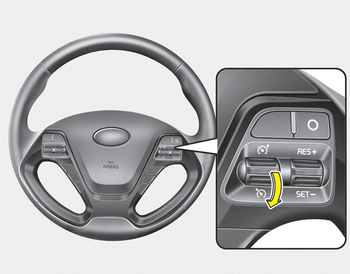
1. Move the lever down ( ) on the
steering wheel, to turn the system on.
The cruise indicator light will illuminate.
) on the
steering wheel, to turn the system on.
The cruise indicator light will illuminate.
2. Accelerate to the desired speed, which must be more than 30 km/h (20 mph).
✽ NOTICE - Manual transaxle
For manual transaxle vehicles, you should depress the brake pedal at least once to set the cruise control after starting the engine.
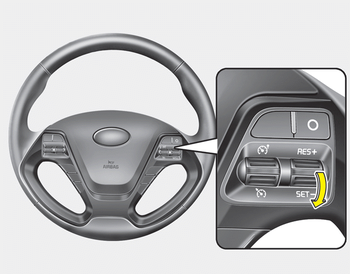
3. Move the lever down (to SET-), and release it at the desired speed. The cruise set indicator light will illuminate. Release the accelerator pedal at the same time. The desired speed will automatically be maintained.
On a steep grade, the vehicle may slow down or speed up slightly while going downhill.
 Cruise control switch
O: Cancels cruise control operation.
: Turns cruise control system on
or
off.
RES+: Resumes or increases cruise
control speed.
SET-: Sets or decreases cruise control
speed. ...
 To increase cruise control set
speed
To increase cruise control set
speed
Follow either of these procedures:
Move the lever up (to RES+) and hold
it.Your vehicle will accelerate. Release
the lever at the speed you want.
Move the lever up (to RES+) and
relea ...
Other information:
Kia Cee'd JD Service Manual: Repair procedures
Compession Pressure Inspection
If the there is lack of power, excessive oil consumption or poor fuel
economy, measure the compression pressure.
1.
Make sure the oil in the cran ...
Kia Cee'd JD Owners Manual: Heating and air conditioning
1. Start the engine.
2. Set the mode to the desired position.
To improve the effectiveness of heating
and cooling:
- Heating:
- Cooling:
3. Set the temperature control to the
desired position.
4. Set the air intake control to the outside
(fresh) air or recirculated position.
5. Set ...
