
Kia Cee'd: Smart key function / Tailgate unlocking
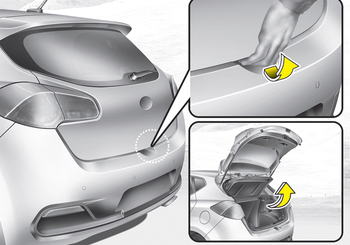
■ 3 Door and 5 Door
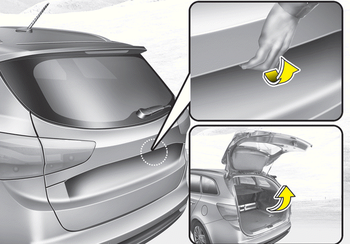
■ Wagon
1.Carry the smart key.
2. Press the tailgate handle switch.
3. The tailgate will unlock.
✽ NOTICE
- Once the tailgate is opened and then closed, the tailgate will lock automatically.
- The button will only operate when the smart key is within 0.7 m (28 in.) from the tailgate handle.
 Unlocking
1. Carry the smart key.
2.Press the button of the front outside
door handle.
3.All doors will unlock and the hazard
warning lights will blink twice. Also, the
outside rearview mirror will auto ...
 Smart key precautions
✽ NOTICE
If, for some reason, you happen to lose
your smart key, you will not be able to
start the engine. Tow the vehicle, if
necessary, we recommend that you
contact an authorized ...
Other information:
: Under Hood Fuse Box
Locating the Under Hood Fuse Box
Accessing the Under Hood Fuse Box
Pull the latch toward you and remove
the top cover.
Pull the connector lever upward.
Pull the connector upward to remove
it.
Pull both latches toward you and
remove the fuse box.
Turn the fuse box over and open the
lid.
Ide ...
Kia Cee'd JD Service Manual: TPMS Receiver Description and operation
Description
It search automatically sensor location and learn the new sensor.
To check defect of system or vehicle, use the sensor information, distance,
indistinct noise, automatic learning status, vehicle battery condition, and
inner receiver condition.
...
