
Kia Cee'd: Smart Key System / Smart Key Unit Repair procedures
Kia Cee'd JD Service Manual / Body Electrical System / Smart Key System / Smart Key Unit Repair procedures
| Inspection |
Smart Key Unit
| – |
Refer to Smart key system - "Smart key Diagnostic"
|
Smart Key Switch
| – |
Refer to Smart key system - "Smart key Diagnostic"
|
Antenna
| – |
Refer to Smart key system - "Smart key Diagnostic"
|
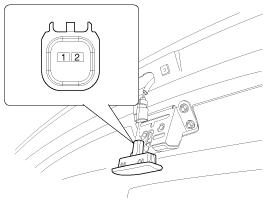
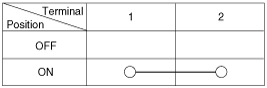
Tailgate Open Switch
| 1. |
Check for continuity between the trunk/tailgate lid open switch terminals.
|
| 2. |
If continuity is not specified, inspect the switch
|
| Removal |
Smart Key Unit
| 1. |
Disconnect the negative (-) battery terminal.
|
| 2. |
Remove the glove box housing.
(Refer to Body - "Glove Box Housing")
|
| 3. |
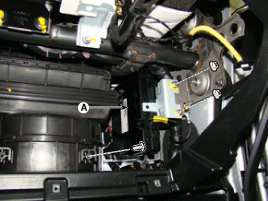
Remove the smart key unit (A) with loosening nuts and screw, then disconnect
the connector.
|
Interior #1 Antenna
Take care not to scratch the crash pad and related parts.
|

| 1. |
Disconnect the negative (-) battery terminal.
|
| 2. |
Remove the crash pad center lower panel.
(Refer to Body - "Main Crash Pad Assembly")
|
| 3. |
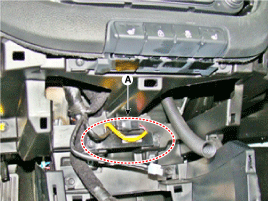
Disconnect the connector, then remove the interior #1 antenna (A) after
loosening 2 screws.
|
Interior #2 Antenna
Take care not to scratch the crash pad and related parts.
|
| 1. |
Disconnect the negative (-) battery terminal.
|
| 2. |
Remove the floor console assembly.
(Refer to Body - "Floor Console Assembly")
|
| 3. |
Disconnect the connector, then remove the interior #2 antenna (A) with
loosening 2 screws.
|
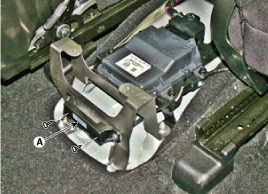
Trunk/Tailgate Antenna
| 1. |
Disconnect the negative (-) battery terminal.
|
| 2. |
Remove the rear transverse trim.
(Refer to Body - "Rear Transverse Trim")
|
| 3. |
Disconnect the connector, then remove the trunk/tailgate antenna (A)
with loosening 2 nuts.
|
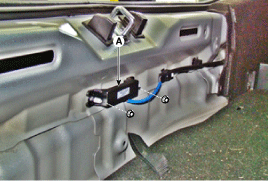
Exterior Bumper Antenna
| 1. |
Disconnect the negative (-) battery terminal.
|
| 2. |
Remove the rear bumper beam assembly.
(Refer to Body - "Rear Bumper Beam Assembly")
|
| 3. |
Disconnect the connector, then remove the rear bumper antenna (A) with
loosening 2 screws.
|
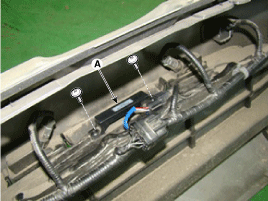
Buzzer
| 1. |
Disconnect the negative (-) battery terminal.
|
| 2. |
Remove the front left head lamp.
(Refer to Lighting System - "Head Lamps")
|
| 3. |
Remove the buzzer (A) after disconnecting the connector.
|
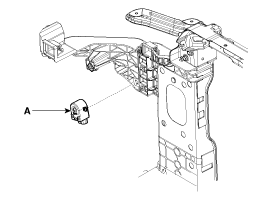
Door Outside Handle
| 1. |
Disconnect the negative (-) battery terminal.
|
| 2. |
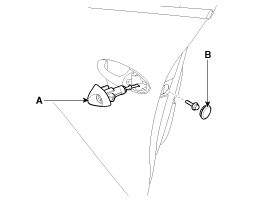
Loosen the mounting bolt after removing the holl pulg (B).
|
| 3. |
Remove the front door outside hand cover (A).
|
| 4. |
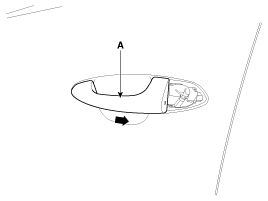
Remove the front door outside handle (A) by sliding it rearward.
|
| 5. |
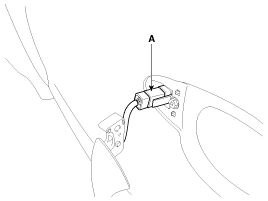
Disconnect the front door outside handle connector (A).
|
Tailgate Open Switch
| 1. |
Disconnect the negative (-) battery terminal.
|
| 2. |
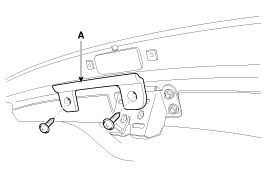
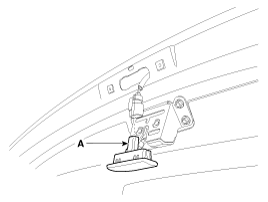
Remove the guide panel (A) after loosening the screws.
|
| 3. |
Disconnect the tailgate open switch connector (A) after loosening the
screws.
|
| Installation |
Smart Key Unit
| 1. |
Install the smart key unit.
|
| 2. |
Connect the connector and install the smart key unit.
|
| 3. |
Install the glove box housing.
|
| 4. |
Install the negative (-) battery terminal and check the smart key system.
|
Interior #1 Antenna
| 1. |
Install the interior #1 antenna.
|
| 2. |
Install the crash pad center lower panel.
|
| 3. |
Install the negative (-) battery terminal and check the smart key system.
|
Interior #2 Antenna
| 1. |
Install the interior #2 antenna.
|
| 2. |
Install the floor console assembly.
|
| 3. |
Install the negative (-) battery terminal and check the smart key system.
|
Trunk/Tailgate Antenna
| 1. |
Install the trunk/tailgate antenna.
|
| 2. |
Install the rear transverse trim.
|
| 3. |
Install the negative (-) battery terminal and check the smart key system.
|
Exterior Bumper Antenna
| 1. |
Install the exterior bumper antenna.
|
| 2. |
Install the rear bumper beam and bumper.
|
| 3. |
Install the negative (-) battery terminal and check the smart key system.
|
Buzzer
| 1. |
Install the buzzer.
|
| 2. |
Install the front left head lamp.
|
| 3. |
Install the negative (-) battery terminal and check the smart key system.
|
Door Outside Handle
| 1. |
Install the door outside handle.
|
| 2. |
Install the door trim.
|
| 3. |
Install the negative (-) battery terminal and check the smart key system.
|
Trunk/Tailgate Open Switch
| 1. |
Install the tailgate open switch.
|
| 2. |
Install the guide panel.
|
| 3. |
Install the negative (-) battery terminal and check the smart key system.
|
 Smart Key Unit Schematic diagrams
Circuit Diagram
...

Other information:
Kia Cee'd JD Service Manual: Shift Lever Repair procedures
Removal
1.
Disconnect the battery negative (-) cable.
2.
Remove the gear boots (A) and then remove the shift lever knob (B) by
rotating counter-clockwise.
3.
Remove the floor console assembly. ...
Kia Cee'd JD Service Manual: Rear Door Belt Outside Weatherstrip Repair procedures
Replacement
1.
Pull down rear door window glass by pressing the power window glass
switch.
2.
After loosening the mounting screws, then remove the rear door belt
outside weatherstrip (A).
3.
...
© 2017-2026 www.kceed.com
