
Kia Cee'd: Electric Power Steering / Schematic diagrams
| Schematic Diagrams |
MDPS Circuit Diagram
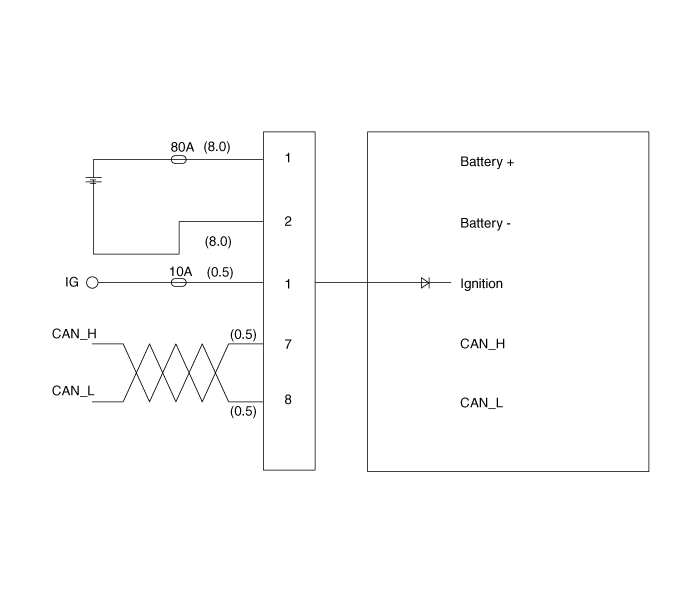
Harness Connector
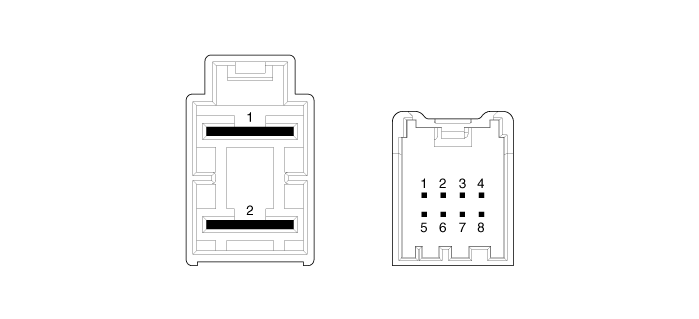
|
Connector |
Pin no |
Pin name |
|
Battery |
1 |
Battery + |
|
2 |
Battery - |
|
|
Vehicle signal |
1 |
Igntion |
|
2 |
- |
|
|
3 |
- |
|
|
4 |
- |
|
|
5 |
- |
|
|
6 |
- |
|
|
7 |
CAN_High |
|
|
8 |
CAN_Low |
 Components and components location
Components
1. Steering
column shaft
2. ECU
3. Motor
4. Steering gear box
...
 Repair procedures
General Inspection
After or before servicing the EPS system, perform the troubleshooting and test
procedure as follows. Compare the system condition with normal condition in
the ...
Other information:
Kia Cee'd JD Owners Manual: Room lamp
■ Type A
Type A
Press the button to turn the light on or off.
If the map lamp turns on by the map
lamp switch, the room lamp will turn on.
■ Type B
Type B
Press the switch to turn on the
room lamp.
Press the switch O to turn off the room
lamp. ...
Kia Cee'd JD Service Manual: Multimedia Jack Description and operation
Description
The multimedia jack on the console upper cover is for customers who like to
listen to external portable music players like the MP3, iPod and etc., through
the vehicle's sound system when it is linked to this jack. The customer has
this added option.
In c ...
© 2017-2026 www.kceed.com
