
Kia Cee'd: Roof Trim / Roof Trim Assembly Repair procedures
Kia Cee'd JD Service Manual / Body (Interior and Exterior) / Roof Trim / Roof Trim Assembly Repair procedures
| Replacement |
|

|

| 1. |
Remove the rear seat assembly.
(Refer to Rear Seat - "Rear Seat Assembly")
|
| 2. |
Remove the front pillar trim.
(Refer to Interior Trim - "Front Pillar Trim")
|
| 3. |
Remove the canter pillar upper trim.
(Refer to Interior Trim - "Center Pillar Trim")
|
| 4. |
Remove the luggage side trim.
(Refer to Interior Trim - "Luggage Side Trim")
|
| 5. |
Remove the rear pillar trim.
(Refer to Interior Trim - "Rear Pillar Trim")
|
| 6. |
Remove the sunvisor and retainer.
(Refer to Roof Trim - "Sunvisor")
|
| 7. |
Remove the assist handle.
(Refer to Roof Trim - "Assist Handle")
|
| 8. |
Remove the overhead console lamp.
|
| 9. |
Remove the room lamp. [General type]
|
| 10. |
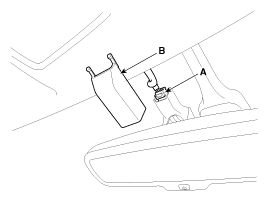
Remove the ECM mirror cover (B).
|
| 11. |
Disconnect the ECM mirror connector (A).
|
| 12. |
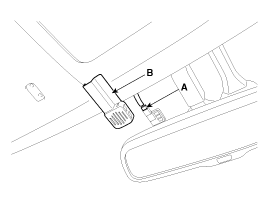
Remove the auto defog sensor cover (B).
|
| 13. |
Disconnect the auto defog sensor connector (A).
|
| 14. |
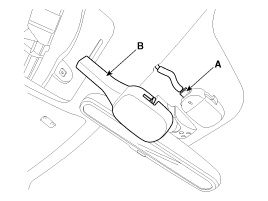
Remove the rain sensor cover (B).
|
| 15. |
Disconnect the rain sensor connector (A).
|
| 16. |
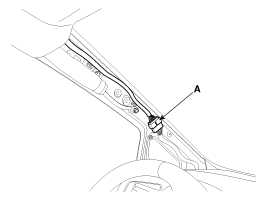
Disconnect the roof trim main connector (A) and the mounting clips in
the front pillar.
|
| 17. |
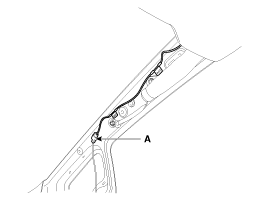
Disconnect the roof antenna connector (A) and the mounting clips in
the front pillar.
|
| 18. |
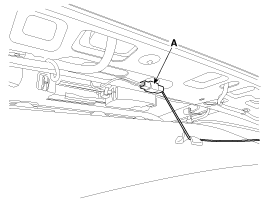
Disconnect the roof antenna connector (A).
|
| 19. |
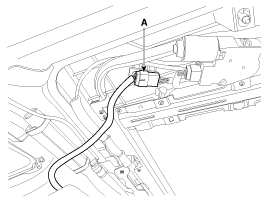
Disconnect the panoramaroof motor connector (A).
|
| 20. |
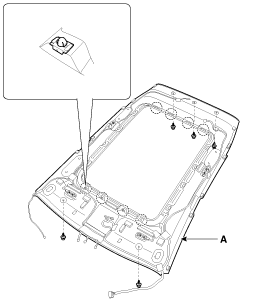
Detach the clips, then remove the roof trim assembly (A).
|
| 21. |
Remove the vanity lamp.
|
| 22. |
Remove the hands free mic.
|
| 23. |
Remove roof trim wiring harness (A) from the roof trim (B).
|
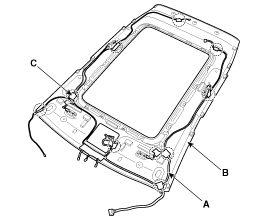

| 24. |
Install in the reverse order of removal.
|
 Roof Trim Assembly Components and components location
Component Location
1. Roof Trim Assembly
...
 Interior Trim
...
Other information:
Kia Cee'd JD Owners Manual: Phonebook List Best Practice
1) Do not store single-name entries
(e.g., “Bob”, “Mom”, “Kim”, etc.).
Instead, always use full names
(including first and last names) for
phonebook (e.g., use “Jacob
Stevenson” instead of “Dad”).
2) Do not use abbreviations (i.e., use
“Lieutenant” instead of “ ...
Kia Cee'd JD Owners Manual: Warning message
The message will appear when camera’s
field of view is covered by some objects.
The system stops until the field of view is
normal.
Check the windshield around the camera
view area.
If the system does not work normally
even though camera’s field of view is
cleared, we recommend t ...
© 2017-2026 www.kceed.com
