
Kia Cee'd: Panoramaroof / Roller Blind Motor Repair procedures
Kia Cee'd JD Service Manual / Body Electrical System / Panoramaroof / Roller Blind Motor Repair procedures
| Inspection |
| 1. |
Disconnect the negative (-) battery terminal.
|
| 2. |
Remove the roof trim assembly.
(Refer to Body - "Roof Trim Assembly")
|
| 3. |
Disconnect the connector (A).
|
| 4. |
Remove the panoramaroof motor (B) after loosening 3 bolts.
|
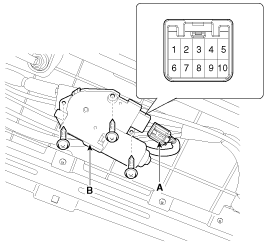
| 5. |
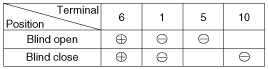
Ground the terminals as below table, and check that the roller blind
motor operates.
|

| Resetting The Panoramaroof |
Whenever the vehicle battery is disconnected or discharged, or you use the emergency
handle to operate the Panoramaroof, you have to reset your Panoramaroof system
as follows :
| 1. |
Turn the ignition key to the ON position and then close the panoramaroof
completely.
|
| 2. |
Release the panoramaroof control lever.
|
| 3. |
Press and hold the CLOSE button for more than 10 seconds until the panoramaroof
has moved slightly.
|
| 4. |
Release the panoramaroof control lever.
|
| 5. |
Press and hold the CLOSE button once again within 3 seconds until the
panoramaroof do as follows;
|
| 6. |
Reset procedure of panorama system is finished.
|
Protecting Motor From Overheating
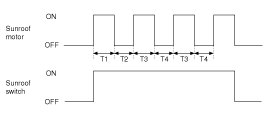
In order to protect the panoramaroof motor from overheating from continuous
motor operation, the panoramaroof ECU controls the Run-time and Cool-time of
the motor as follows:
| 1. |
The panoramaroof ECU detects the Run- time of motor
|
| 2. |
Motor can be operated continuously for the 1st run-time (120 ± 10sec.).
|
| 3. |
The continuous operation of motor stops after the 1st Run-time (120
± 10sec.).
|
| 4. |
Then Motor is not operated for the 1st Cool-time (18 ± 2sec.).
|
| 5. |
Motor is operated for the 2nd Run-time (10 ± 2sec.) at the continued
motor operation after 1st Cool-time (18 ± 2sec.)
|
| 6. |
The continuous operation of motor stops operating after the 2nd Run-time
(10 ± 2sec.)
|
| 7. |
Motor is not operated for the 2nd Cool-time (18 ± 2sec.).
|
| 8. |
Motor repeats the 2nd run-time and 2nd cool-time at the continued motor
operation.
T1 : 120 ± 10 sec., T2 : 18 ± 2 sec.,
T3 : 10 ± 2 sec., T4 : 18 ± 2 sec.
|
 Panoramaroof Motor Repair procedures
Inspection
1.
Disconnect the negative (-) battery terminal.
2.
Remove the roof trim assembly.
(Refer to Body - "Roof Trim ...
 Lighting System
...
Other information:
Kia Cee'd JD Owners Manual: Opening the hood
1. Pull the release lever to unlatch the
hood. The hood should pop open
slightly.
WARNING
Open the hood after turning off the
engine on a flat surface, shifting
the shift lever to the P(Park) position
for automatic transaxle and to
the 1(First) gear or R(Reverse) for
manual transax ...
Kia Cee'd JD Service Manual: Door Scuff Trim Repair procedures
Replacement
[5Door]
•
Put on gloves to protect your hands.
•
...
© 2017-2026 www.kceed.com
